
Previous Post
Acknowledgements
Prof N D Gangadhar and Prof Jismi Jos Choondal of MSRSAS, Bangalore college are highly acknowledged for providing help in solving this assignment.This solution was done as part of solving the assignment of ESD2528(Advanced System Programming) module of the course MSc[Engg.] in Computer Science and Networking branch in M S Ramaiah School of Advanced Studies under Coventry University,United Kingdom.
3.1 Introduction
In this part a user level application is developed in C for the device driver that was developed in Part B. This user application creates two device files ( FIFO ) and gives them proper permission by making a FIFO read only and another write only. The application shall allow user to enter the strings to be written to a write only FIFO and the same contents shall be read from the read only FIFO.
3.2 Design of User level program
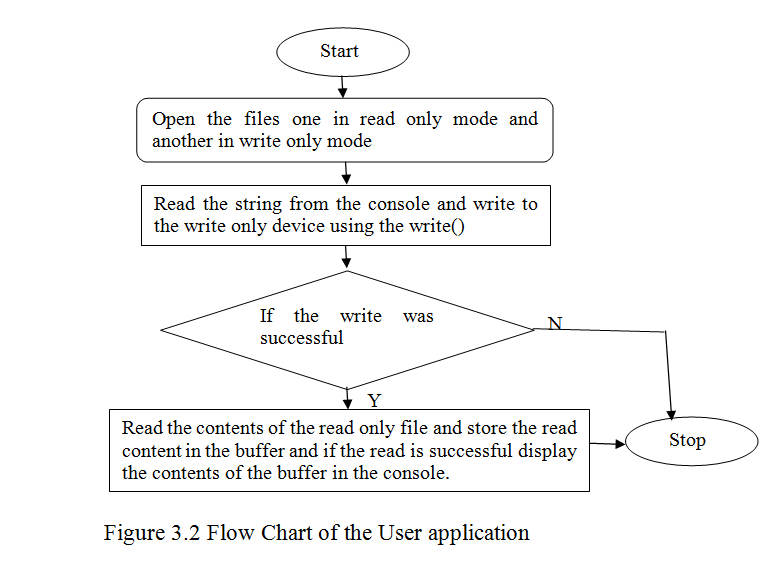
3.1 Implementation of user level program
The user level program is written in C, To start define the necessary header files.
Use the stdio.h for printf () and perror().fcntl.h for open(),stdlib from exit() ,unistd.h for read and write (),string.h to use string methods like strlen etc.
#include // for printf(), perror()
#include <fcntl.h> // for open()
#include <stdlib.h> // for exit()
#include <unistd.h> // for read(), and write
#include <string.h>
Declare the variables to use in the program. Initialize a buffer buf of char type to hold 1024 characters and a variable to hold the return type of the read and write ().
char buf[1024] = {”};
ssize_t i_read, i_write;
Open the file using open command. Open the file /dev/cva0 in write only mode using the open command and store the file descriptor of it in fd variable. If the open () was not successful return the error.
int fd = open( “/dev/cva0”, O_WRONLY|O_APPEND);
if ( fd < 0 ) { perror( “/dev/cva0” ); exit(1); }
Do same thing for another file /dev/cva1 but make it read only.
int fd1 = open(“/dev/cva1”,O_RDONLY);
if ( fd1 < 0 ) { perror( “/dev/cva1” ); exit(1); }
Read the string from the console to be written to /dev/cva0 using the fgets() which takes the char* to store the contents read from the console to the buffer ,size of the buffer and the from where the buffer to be populated ( here it is stdin as it is from console).
fgets(buf,sizeof(buf),stdin);
Now write the contents of the buffer to the /dev/cva0 using the write() which takes the file descriptor ,the buffer and the length of the buffer to be written as arguments.
i_write=write(fd,buf,strlen(buf));
If the write() is successful the return shall be positive else the i_write shall be less than 0.Now read the contents of the /dev/cva1 file using the read() which takes the file descriptor, the buffer to store the read characters and the count of characters to read. If the read is successful the return value is positive else it will be negative. If read is successful print the contents of the buffer to console.
i_read = read(fd1,&buf,1024);
if((int) i_read < 0) {perror(“error reading from /dev/cva1\n”); return -1;}
printf(“%s”,buf);
Finally close the file descriptors. See the complete code in Appendix D
3.1 Testing and validation
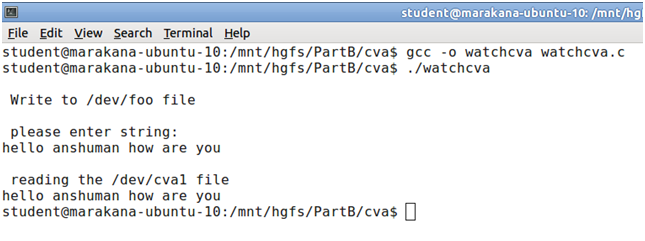
The user level program watchcva.c is compiled using gcc command from the location where the file is present. The command used to compile is gcc –o watchcva watchcva.c.The –o option names the executable file with the name specified. Here the executable after compiling will be watchcva. If the compiling is successful the object file is created.

Then run the executable as ./watchcva
3.5 Conclusion.
The user level program to test the driver was done. It was found that the read and write () of the device file in turn calls the respective read and write function of the device driver. Many things cannot be done at the kernel level so at the user level it should be managed like buffer overflow etc.
References
____________________________________________________________________
[1] Abeni,L., Goel,A., Krasic,C. ,Snow, J., and Walpole,J.(2002)A measurement-based analysis of the real-time performance of the linux kernel,p1–4.
[2] Barbalace,A., Luchetta,A.,Manduchi,G., Moro,M., Soppelsa,A., and Taliercio,C.(Feb 2008),Performance Comparison of VxWorks, Linux, RTAI,and Xenomai in a Hard Real-Time Application.IEEE TRANSACTIONS ON NUCLEAR SCIENCE, V(55-1)
[3] Bovet,D.P.and Cesati,(2005)M.Understanding the Linux Kernel. O’Reilly, 3rd edition.
[4]Corbet,J.,Kret-Hartman,G.and Rubini,A.(2005)Linux device Driver.O’Reilly,3rd Edition.
[5] Xenomai Documentation [Online] available from [ 18 February 2013]
[6]Marchesotti,M.,Migliardi,M.and Podesta,R.(June 2006)A measurement-based analysis of the responsiveness of the Linux kernel,V(10),p 397–408. IEEE Computer Society.
 TheIntRendz