Why modern software teams moved from “it works on my machine” to self-healing infrastructure.
The image illustrates the transition from traditional Waterfall methodology to modern DevOps and AIOps in software development.
Introduction
There was a time when software delivery teams spent more time blaming each other than solving problems.
Developers would say:
“It works perfectly on my machine.”
Operations teams would respond:
“Then why is production down?”
This constant friction between development and operations became one of the biggest bottlenecks in software engineering.
That conflict gave birth to one of the most transformative movements in modern technology:
DevOps
Today, DevOps is no longer just about tools.
It is a culture. It is an engineering mindset. It is a delivery philosophy. And now, with AI entering infrastructure operations, DevOps is evolving again into what many call:
AIOps — Artificial Intelligence for IT Operations
In this blog, we will explore:
Why DevOps emerged
How software delivery evolved over decades
The CALMS philosophy
Traditional SDLC vs DevOps
The DevOps lifecycle and toolchain
DORA metrics for elite engineering teams
AI in DevOps and AIOps
Auto-remediation and self-healing infrastructure
Real-world enterprise challenges
The future of intelligent operations
The Real Problem DevOps Was Born to Solve
Before DevOps, software teams largely worked in silos.
Typical structure:
Development Team
QA Team
Operations Team
Infrastructure Team
Each team worked independently.
This caused:
Delayed releases
Slow feedback loops
Frequent production failures
Deployment anxiety
Finger-pointing culture
Massive operational overhead
A developer’s goal was:
Deliver features quickly.
Operations teams had a different goal:
Maintain system stability.
Both objectives were important.
But they constantly clashed.
This conflict became the foundation for DevOps.
The Evolution of Software Delivery
1. Waterfall Era (1970s – 1990s)
The waterfall model followed a strict linear process:
Requirements → Design → Development → Testing → Deployment
Characteristics
Sequential execution
Heavy documentation
Long release cycles
Very slow feedback
Testing happened at the end
Biggest Problem
Bugs were discovered too late.
Fixing issues became extremely expensive.
2. Agile Revolution (2001)
The Agile Manifesto changed software development forever.
Instead of long release cycles, teams adopted:
Iterative development
Collaboration
Frequent feedback
Customer-centric delivery
Agile introduced the idea that:
Software should evolve continuously.
But Agile alone was not enough.
Developers became faster. Operations remained slow.
A new bottleneck appeared.
3. DevOps Emerges (2009)
In 2009, Patrick Debois organized the first DevOpsDays conference in Ghent.
This moment is widely considered the birth of DevOps.
The movement focused on:
Collaboration
Automation
Continuous delivery
Faster deployments
Shared ownership
One legendary book accelerated this movement:
The Phoenix Project
This book transformed DevOps from a technical idea into an engineering culture.
Visual Timeline of Software Evolution
1970s-1990s → Waterfall
2001 → Agile Manifesto
2009 → DevOps Movement
2013 → DORA Metrics
2016+ → SRE, Platform Engineering, Cloud Native
2020+ → AI-Augmented DevOps & AIOps
The CALMS Framework
One of the most important philosophical foundations of DevOps is:
CALMS
CALMS explains what successful DevOps organizations focus on.
C — Culture
Break silos.
Build shared ownership between:
Developers
QA
Operations
Security
Infrastructure
Teams win together. Teams fail together.
A — Automation
Automate repetitive manual tasks.
Examples:
CI/CD pipelines
Infrastructure provisioning
Monitoring
Testing
Deployments
Automation reduces:
Human error
Deployment delays
Operational overhead
L — Lean
Reduce waste.
Deliver in small batches.
Instead of deploying huge risky releases once every few months:
Deploy smaller, safer releases continuously.
M — Measurement
If you cannot measure it, You cannot improve it.
Modern engineering relies heavily on metrics.
Examples:
Deployment frequency
Failure rate
Recovery time
Lead time
S — Sharing
Knowledge must flow across teams.
Transparent communication is essential.
Documentation, monitoring dashboards, alerts, and postmortems should be shared.
Traditional SDLC vs DevOps
Traditional SDLC
DevOps
Teams work in silos
Cross-functional collaboration
Sequential workflow
Continuous delivery
Long release cycles
Frequent small releases
Testing at the end
Continuous automated testing
Slow feedback
Real-time feedback
High deployment risk
Incremental safer deployments
Manual operations
Automated pipelines
Late error detection
Early error detection
Why DevOps Improved Client Trust
In traditional models:
Projects could take months before showing results.
Clients had little visibility.
Delays created uncertainty.
In DevOps:
Working software is delivered quickly.
Features evolve incrementally.
Stakeholders see constant progress.
This dramatically improves:
Customer confidence
Delivery transparency
Business agility
DevOps Is Not Always the Right Answer
One important misconception:
DevOps does NOT replace everything.
Some industries still require:
Manual approvals
Manual provisioning
Compliance-driven workflows
Controlled infrastructure operations
Examples:
Banking
Healthcare
Government systems
Highly regulated enterprise environments
Automation must always respect compliance boundaries.
This is why experienced engineers must understand BOTH:
Automation
Manual operational processes
Understanding the DevOps Lifecycle
The DevOps lifecycle is often represented as an infinity loop.
Because tools evolve. Engineering fundamentals do not.
DORA Metrics — Measuring Engineering Excellence
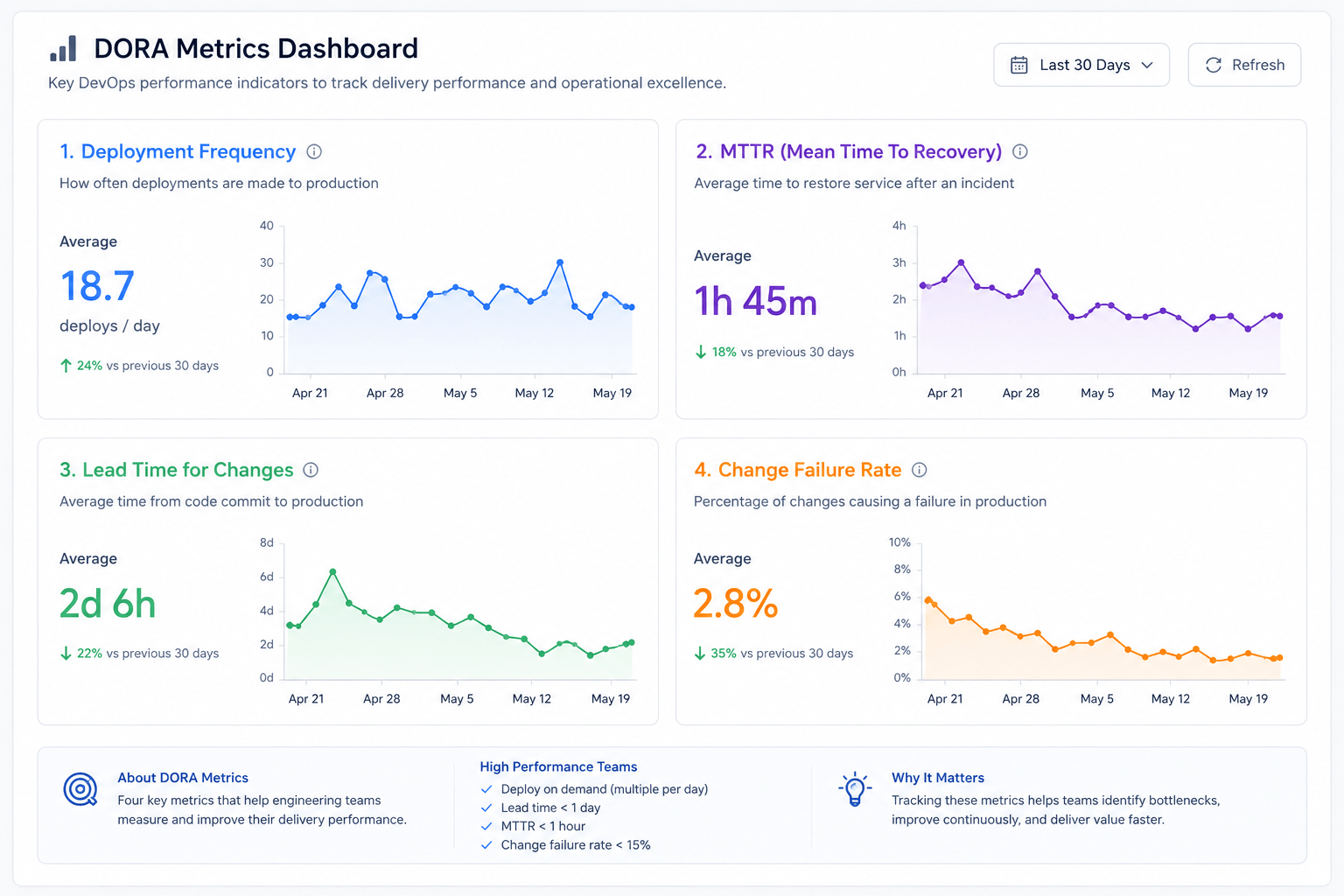
In 2013, DORA (DevOps Research and Assessment) introduced four key metrics that became the global standard for measuring software delivery performance.
Google later helped popularize these metrics.
Even in 2024, DORA reports continue to show that elite engineering teams maintain strong performance during:
Layoffs
Budget cuts
Organizational instability
Because strong engineering culture scales.
The Four DORA Metrics
1. Deployment Frequency
How often code is deployed to production.
Elite teams:
Deploy multiple times per day
2. Lead Time for Changes
Time from code commit to production deployment.
Elite benchmark:
Less than 1 hour
3. Mean Time To Recovery (MTTR)
How quickly systems recover from incidents.
Elite benchmark:
Less than 1 hour
4. Change Failure Rate
Percentage of deployments causing failures.
Elite benchmark:
Between 0–15%
Why DORA Metrics Matter
These are NOT vanity metrics.
They are diagnostic metrics.
Example:
If your team:
Deploys once a month
Takes 3 days to recover from failures
Then DORA metrics immediately highlight where improvement is needed.
The Rise of AI in DevOps
Today, AI is influencing nearly every engineering domain.
DevOps is no exception.
However, the reality is important:
AI has not fully transformed DevOps yet.
Most enterprise systems still rely heavily on:
Rule-based automation
Traditional monitoring
Human-driven incident response
But AI is slowly enhancing operational intelligence.
Where AI Is Transforming DevOps
1. Code Generation
AI-powered coding assistants:
GitHub Copilot
Amazon CodeWhisperer
Cursor
Gemini-based coding tools
These tools improve developer productivity.
2. Predictive Failure Detection
Machine learning models analyze:
Logs
Metrics
Traffic patterns
Infrastructure telemetry
This helps predict risky deployments before failures occur.
3. Intelligent Alerting
Traditional monitoring creates noisy alerts.
AI systems help:
Reduce false positives
Prioritize incidents
Escalate intelligently
Recommend actions
4. Auto-Remediation
This is one of the most exciting areas.
Systems automatically:
Detect issues
Diagnose root causes
Apply fixes
Validate recovery
Without human intervention.
Understanding Auto-Remediation
Auto-remediation means:
Systems can automatically detect and fix operational issues.
Examples:
Restart failed services
Replace unhealthy servers
Rotate leaked credentials
Block suspicious IPs
Patch vulnerabilities
Scale infrastructure
Auto-Remediation Workflow
Monitoring Detects Issue
↓
Alert Triggered
↓
Automation Playbook Executes
↓
Corrective Action Applied
↓
Validation Performed
↓
Incident Closed
Real-World Example: Secret Key Leak
Imagine a developer accidentally commits an AWS access key into GitHub.
Many beginners think:
“Just delete the key from GitHub.”
That is NOT enough.
Correct remediation:
Revoke the leaked key immediately
Rotate credentials
Remove the secret from the repository
Trigger repository protection policies
Audit system access
This is where automated remediation workflows become extremely valuable.
What Is AIOps?
AIOps stands for:
Artificial Intelligence for IT Operations
It adds an intelligence layer on top of traditional automation.
Traditional automation follows:
IF condition happens → Execute predefined script
AIOps goes beyond static rules.
It can:
Learn patterns
Predict incidents
Correlate events
Suggest root causes
Optimize remediation
Traditional Automation vs AIOps
Traditional Automation
AIOps
Rule-based
Learning-based
Reactive
Predictive
Static thresholds
Behavioral analysis
Limited context
Multi-signal intelligence
Manual RCA
Automated correlation
Simple scripts
Intelligent remediation
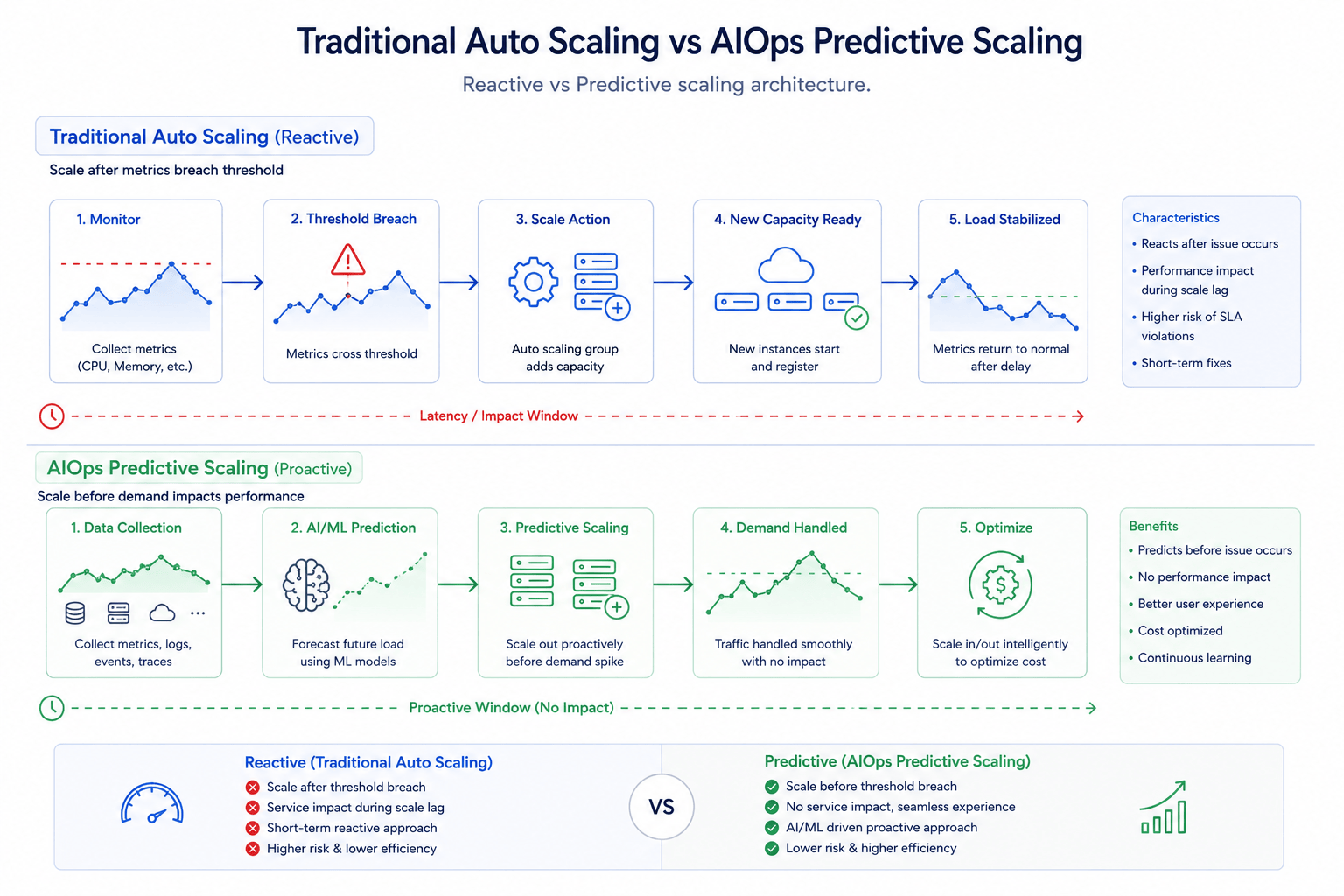
Example: CPU Spike Scenario
Traditional Auto Scaling
Typical rule:
IF CPU > 80% → Add more instances
Problem:
Scaling starts after the issue happens
Users already experience latency
No understanding of root cause
AIOps-Based Scaling
AIOps can:
Detect recurring traffic patterns
Predict spikes before they occur
Scale proactively
Correlate logs + traffic + errors
Avoid unnecessary scaling
Example:
If the system learns:
Traffic spikes every day at 9 AM
It can scale infrastructure BEFORE the spike occurs.
This improves:
User experience
Performance stability
Cost optimization
Intelligent Root Cause Analysis (RCA)
Traditional monitoring often shows symptoms.
Example:
High CPU
Increased latency
Error spikes
But engineers still need to investigate manually.
AIOps attempts to correlate:
Logs
Metrics
Infrastructure topology
Historical patterns
Traces
To identify the actual root cause.
Example: Nightly CPU Spike
Imagine a production server showing a recurring CPU spike every night at 2 AM.
Traditional operations:
Alerts open tickets repeatedly
Engineers manually investigate logs
Issue persists for weeks
AIOps approach:
Detect spike pattern
Capture process snapshots automatically
Identify offending process
Trigger remediation script
Kill problematic job automatically
This is the idea of:
Self-healing infrastructure
Why AIOps Is Still Evolving
Despite its promise, AIOps adoption is still limited.
Main reasons:
Compliance concerns
Data governance restrictions
AI hallucination risks
Lack of enterprise trust
Complex integration requirements
Industries like:
Banking
Healthcare
Government
Are extremely cautious.
Because infrastructure telemetry may contain sensitive information.
LLMs vs RAG Systems in Enterprise Operations
Many enterprises avoid directly using large LLMs in operational workflows.
Reason:
Hallucinations
LLMs can confidently provide incorrect outputs.
Instead, enterprises often prefer:
RAG (Retrieval-Augmented Generation)
RAG systems:
Work within constrained datasets
Use approved enterprise knowledge
Reduce hallucination risks
Improve operational reliability
This is particularly important in:
Security
Banking
Enterprise IT operations
The Future of DevOps
The future is moving toward:
Platform Engineering
SRE (Site Reliability Engineering)
AI-Augmented Operations
Intelligent Automation
Self-healing systems
But one thing remains constant:
Engineering fundamentals matter most.
Tools will evolve. Frameworks will evolve. AI systems will evolve.
But understanding:
System design
Monitoring
Reliability
Automation
Root cause analysis
Software delivery principles
Will always remain critical.
Final Thoughts
DevOps was never just about CI/CD pipelines.
It was about:
Breaking silos
Improving collaboration
Accelerating delivery
Building resilient systems
Creating shared ownership
Now, with AI entering operational workflows, we are witnessing the next evolution.
From:
Manual Operations
↓
Automated Operations
↓
Intelligent Operations
The journey from Waterfall → Agile → DevOps → AIOps reflects one core engineering truth:
The faster organizations learn, adapt, and automate responsibly, the more resilient they become.
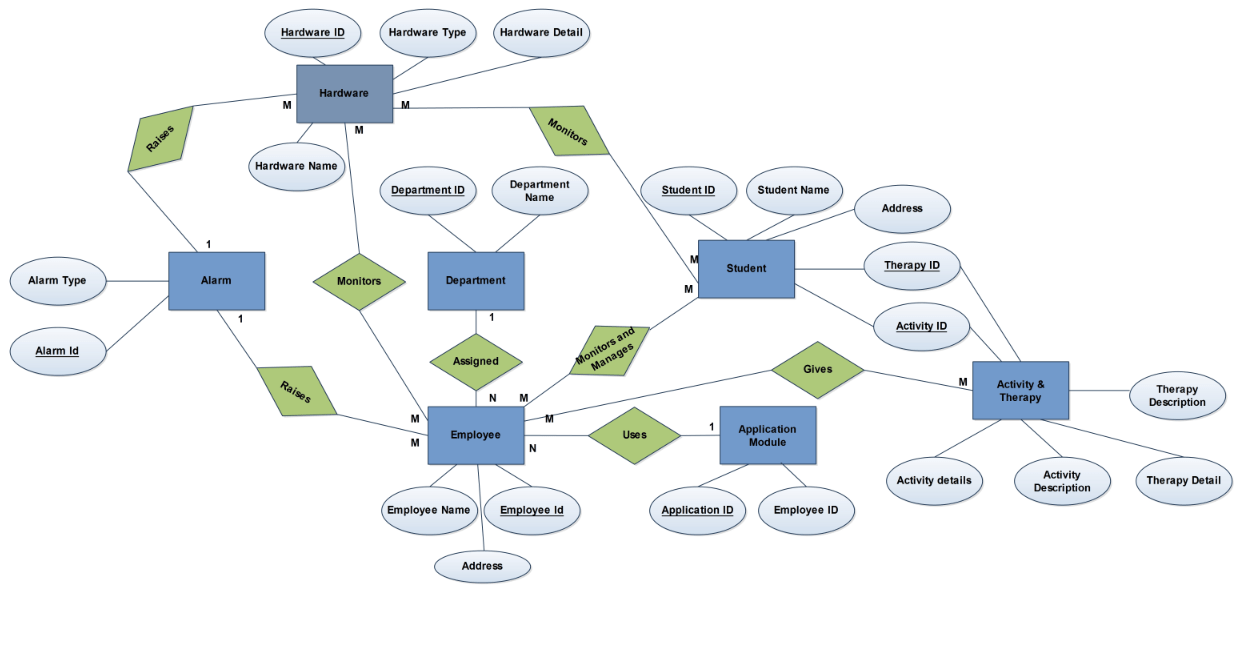
Entity – Relationship model (ER model for short) is an abstract way to describe a database. It usually starts with a relational database, which stores data in tables. Some of the data in these tables point to data in other tables – for instance, your entry in the database could point to several entries for each of the phone numbers that are yours. The ER model would say that you are an entity, and each phone number is an entity, and the relationship between you and the phone numbers is ‘has a phone number’. Diagrams created to design these entities and relationships are called entity–relationship diagrams or ER diagrams. Figure 2.1 is the ER diagram of the solution mentioned in the PART A of this paper.
Figure 2.1 E R Diagram
In this diagram the
Entities are:
Ø Hardware
Ø Alarm
Ø Employee
Ø Department
Ø Student
Ø Application Module
Ø Activity & Therapy
Attributes are:
Hardware Id
Hardware Name
Hardware Type
Hardware Detail
Alarm Type
Alarm Id
Employee Name
Employee Id
Employee Address
Department Id
Department name
Student Id
Student Name
Student Address
Therapy Id
Activity Id
Application Id
Employee Id
Activity Detail
Activity Description
Therapy Detail
Therapy Description
Relationships are:
Raises
Assigned
Monitors
Monitors and Manage
Uses
Gives
Description
Hardware: Here the hardware is an entity and it represents the sensors, RFID readers, CCTV’s. These will be used to monitor and track students, employees and their activities.
Alarm: Alarm is an entity and will be used by the Hardware entity to raise an alarm automatically when it senses some abnormal activity. It can also be used by employees mainly by the security department to raise an alarm manually through the AYS system to notify all in the school.
Employee: Employee is an entity and in the solution it represents all the staffs who work for the school.
Department: It is an entity and it represents various functional departments of the school like Admin, Security, Facility, Therapy and Teacher.
Students: It is an entity and it represents the handicapped students who get admitted to the school for treatment and for various rehabilitation programmes.
Application Module: It is an entity and it is a part of the AYS application where each module can only be used by the respective members of their department to whom the login credentials have been given by the Server Admin (IT).
Activity and Therapy: It is an entity and it is a part of the AYS application which will be used by the employee like therapist and teachers to record the various activities and therapies given to the student.
2.10 DFD
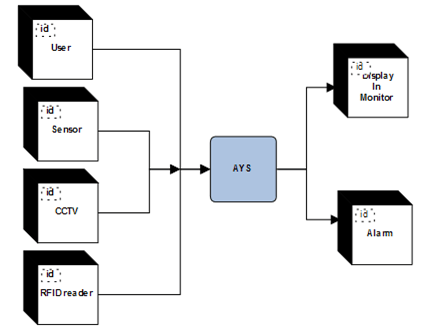
Level 0 DFD:
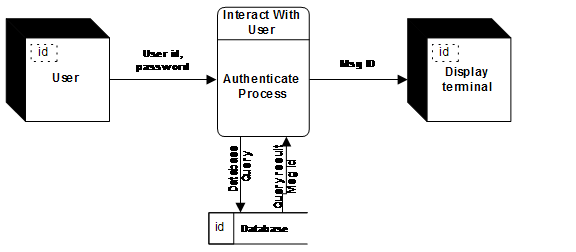
Figure 2.2 Level 0 DFD
Level 1 DFD:
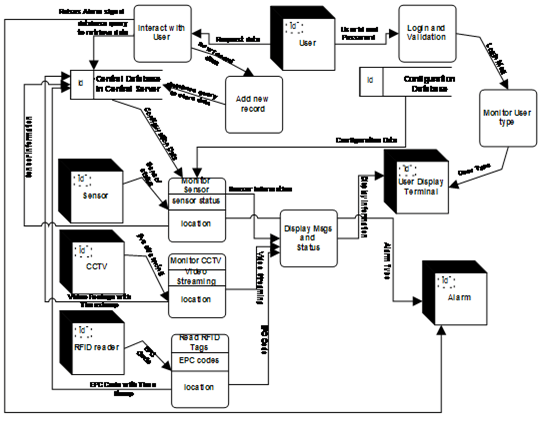
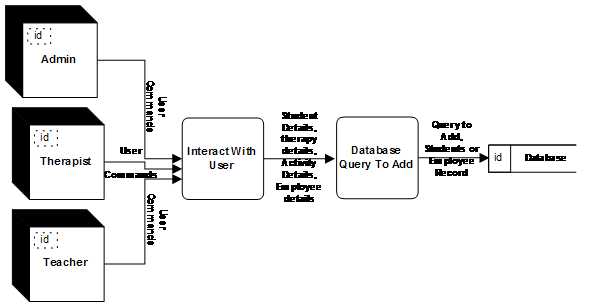
Figure 2.3 Level 1 DFD
Level 2 DFD (Monitor Sensor)
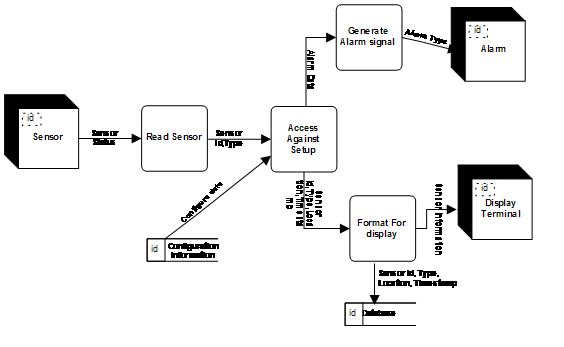
Figure 2.4 Level 2 DFD of Monitor Sensor Process
Level 2 DFD (Monitor CCTV)
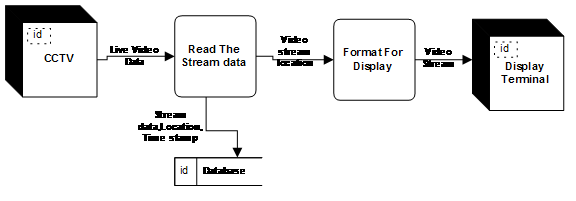
Figure 2.5 Level 2 DFD of Monitor CCTV
Level 2 DFD (Read RFID Tags)
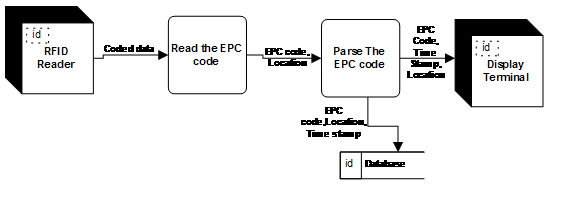
Figure 2.6 Level 2 DFD of Reading RFID Tags
Level 2 DFD (Login and Validation)
Figure 2.7 Level 2 DFD of Login and Validation Process
Level 2 DFD (Add New record)
Figure 2.8 Level 2 DFD of Add new records
Level 2 DFD (Retrieve Record)
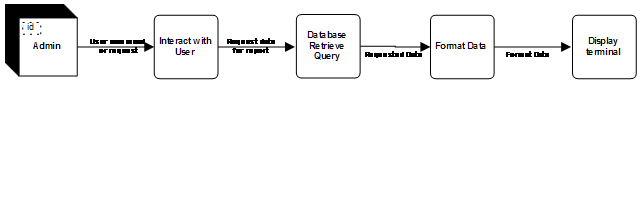
Figure 2.9 Level 2 DFD of retrieving record
2.11 Database Details
2.11. A Employee Table
It is the database table to hold the employee details. Server Admin has select, insert, update and delete rights. Administration department, Facility Management team and Security department has rights to use this table. Rest all department has no permission to access this table.
Employee_Id : Integer ,NOT NULL, (PK)
It is the unique identifier that is assigned to an employee that distinguishes one employee from another.
Employee_name: Char (200)
Name of the employee
Employee_Address: Char (5000)
Address of each employee
Department_Id: Integer, NOT NULL, (FK)
It is the unique identifier of Department table and it says the employee belongs to which department.
Employee_phone: Integer
Phone number of the employee
Employee_email:
It is the email id of the employee
Application_Id: Char(5000)
It is the list of application Id separated by commas and this says the modules of AYS that can be accessed by an employee.
Employee_EPC Code: Integer, NOT NULL, (FK)
It is the field that stores the EPC code of RFID badge of an employee.
2.11. BDepartment Table
It is the database table to hold the department details. Server Admin has select, insert, update and delete rights. Administration department, Facility Management and Security department has rights to use this table. Rest all department has no rights to access this table.
Department_Id: Char (20), NOT NULL,(PK)
It is the unique identifier that distinguishes one department from another
Department_name: Char(100)
Name of the department
Department_details: Char (5000) : It describes the details of the department.
2.11.C Student Table
It is the database table to hold the students details. Server Admin has select, insert, update and delete rights. Administration, Facility Management and Security department has right to access the table. Rest all department has no rights to access this table.
Student_Id: Integer, NOT NULL,(PK)
It is the unique identifier that distinguishes one student from another student.
Student_name: Char (100)
Name of the student
Student_Address: Char (5000)
Address of each student
Student_phoneNumber: Integer
Phone number of student
Student_GuardianName: Char (200)
Guardian name of the student
Student_GuardianContactAddress: Char (5000)
Address of the guardian
Student_GuardianPhoneNumber: Integer
Phone number of the guardian of the student
Student_Fees: Integer
Fees paid by the student
Student_EPCCode:Integer,NOT NULL,(FK)
It is the field that stores the EPC code of RFID badge of a student.
2.11.D Application Table
It is the database table to hold the application details and this table says which module of AYS application can be accesses by which employee Id. Server Admin has select, insert, update and delete rights. Administration department, Facility Management and Security department has rights to access the table. Rest all department has no rights to access this table.
Application_Id: Char(20),NOT NULL,(PK)
It is the unique identifier that distinguishes one AYS module from another.
Application_details: Char(1000)
It says the details of the application.
2.11.E Therapy Table
It is the database table to hold the therapy details and this table says the therapy details and their respective cost available in the school. Server Admin has select, insert, update and delete rights. Administration department has select rights. Therapist team has select, update and insert rights.
Therapy_id : Char(100),NOT NULL,(PK)
It is the unique identifier that distinguishes one therapy from another.
Therapy_description: Char (1000)
Therapy details
Therapy_Cost: integer
Cost of the particular therapy
2.11.F Activity Table
It is the database table to hold the Activity details and this table says the activity details. Server Admin has select, insert, update and delete rights. Administration department has rights. Teacher’s team has select, update and insert rights.
Activity_Id: Char(100), NOT NULL,(PK)
It is the unique identifier that distinguishes an activity from another.
Activity_details: Char(1000)
This describes the activity descriptions.
2.11.G Student Activity & Therapy Details
It is the database table to hold the details of each student and their duration of each activity and therapies taken in a particular date. Server Admin has select, insert, update and delete rights. Administration department has select rights. Teacher’s team and Therapists Team have select, update, insert and delete rights.
Student_Id: Integer, NOT NULL,(PK)
It is the unique identifier that distinguishes one student from another student.
Activity_Id: Char (100), NOT NULL
It is the unique identifier that distinguishes an activity from another.
Therapy_Id : Char(100),NOT NULL,(PK)
It is the unique identifier that distinguishes one therapy from another.
Activity_duration: Integer
It is the column that stores the duration of the activity done by a student
Therapy_Duration:Integer
It is the column that stores the duration of the therapy given to a student
LogDate: Date, NOT NULL
It stores the date on which each activity/therapy given to a student
Total_Cost: integer
It stores the total cost of activity and therapy taken by a student on that particular date.
2.11. H Hardware Table
It is the database table to hold the details of all the hardware needed by the AYS application and their location of installation. Server Admin has select, insert, update and delete rights. Security and Facility team has select right
Hardware_Id: Integer, NOT NULL,(PK)
It is the unique identifier that distinguishes hardware from another.
Hardware_Type: Char (200)
It is the field that says what is the hardware (CCTV, RFID reader, Alarm, sensor)
Hardware_Location: Char (3000)
It is the field that stores the location of installation of a hardware or Bus number if the same has been installed on a bus.
2.12 Data Dictionary
2.12. A
Name
Sensor Status
Aliases
none
Where used/How used
Read sensor(input), Access against setup(output)
Description
Sensor status =sensor id+sensor type + location + time stamp
2.12. B
Name
Configuration Data
Aliases
none
Where used/How used
Access Against set up (input)
Description
Sensor type= sensor id+ Reaction against+ maximum temperature+ Smoke Level
2.12. C
Name
Alarm Data
Aliases
none
Where used/How used
Generate Alarm Signal (input)
Description
Alarm data = alarm type+ alarm sound level
2.12. D
Name
Alarm Data
Aliases
none
Where used/How used
Generate Alarm Signal (input)
Description
Alarm data = alarm type+ alarm sound level
2.12. E
Name
Video Data
Aliases
None
Where used/How used
Read The Stream Data(input),Format for diaplay (out put)
Description
Video data = video+ timestamp+ location of cctv
2.12. F
Name
Coded Data
Aliases
None
Where used/How used
Read the EPC code (input),parse the epc code(output)
Description
Coded Data = EPC Code + RFID Reader ID+ Location code + Time Stamp
2.12. G
Name
User id and Password
Aliases
Uid, pwd
Where used/How used
Authenticate process(input)
Description
User id = * Any alpha numeric character *Password = * any alpha numeric character at least 12 character of length and must have at least a upper case character ,a numeric character and a special character *
2.12. H
Name
Student details
Aliases
None
Where used/How used
Interact with user (input), database query to add (output)
Description
Student details = student name+ student address+ student id+ students guardian name+ students guardian number+ student fees+ handicapped details
2.12. I
Name
Therapy Details
Aliases
None
Where used/How used
Interact with user (input), database query to add (output)
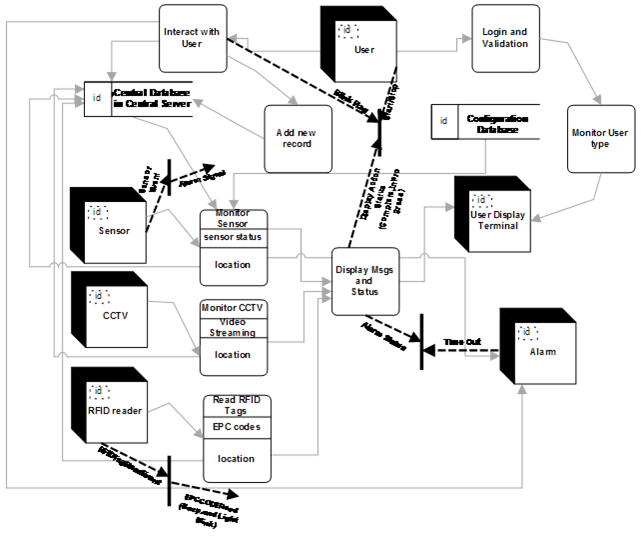
Figure 2.10 Control Flow Diagram of Level 1 of AYS Application
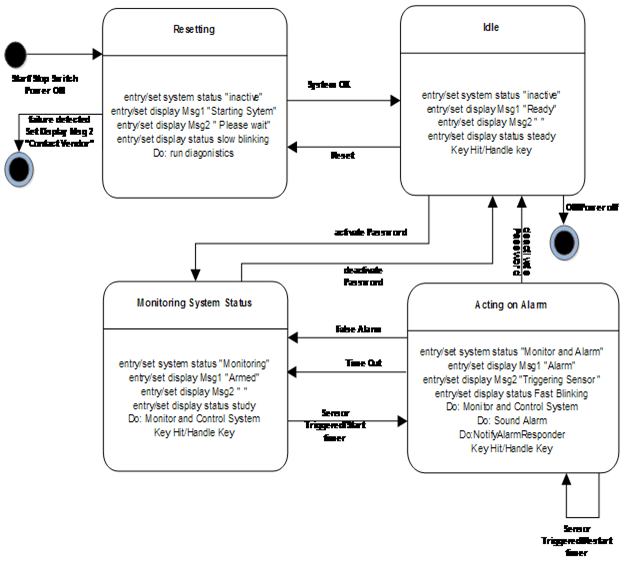
2.14 Control Specs
2.14.1 CSPEC of Sensor
Figure 2.11 State Diagram of sensor
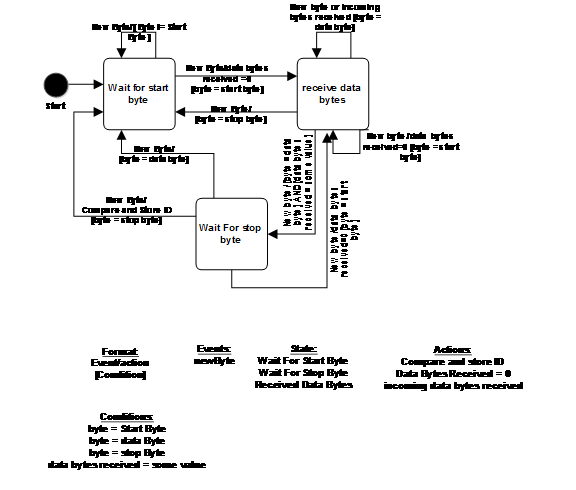
2.14.2 CSPEC of RFID Reader
Figure 2.12 State Diagram of RFID readers
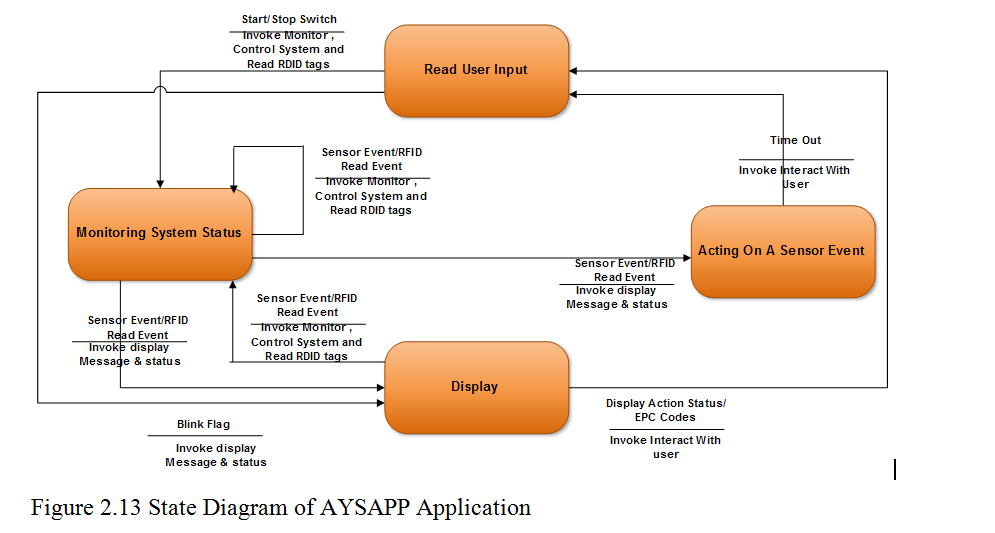
2.14.3 CSPEC of AYSAPP Application
2.15 Process Specification
a. PSPEC of Monitor Sensor
The Monitor Sensor process performs the monitoring of inside/outside environment of the school. Whenever it senses any abnormal activity then it signals Alarm to raise alarm and also it alerts the Security team.
b. PSPEC of Monitor CCTV
The Monitor CCTV tracks all the videos of inside and outside premises of the school and it streams in the Security Module of the AYS application. This process also displays all the videos on screen in 3 x 3 matrix format where the first two rows displays the CCTV footage of the rooms and the last row shows the videos of outside the rooms. This process also provides user to pan and zoom any video. It also saves the videos of all the premises to database with the time stamp.
c. PSPEC of Read RFID Tags
This process reads the RFID tags as being sent to the application by the reader. The reader gets activated as soon as the RFID tags finds in its range. This process is responsible to parse the EPC code present in the RFID tags. This process also learns the location from where the RFID reader has read the tag.
d. PSCPEC of Add New Record
This process is used by the administrator team to add new record to the database; let it be an employee new record or a student’s new record. Each record will have a unique ID which can never be NULL. After saving the new record the process sends a notification to the Server Admin team and to security team to generate an EPC code and write it on a RFID tag to create their ID.
e. PSPEC of Interact with User
This process is used by the AYS application to interact with the user and the server and database through interactive UI of the AYS application.
f. PSPEC of Login and Validation
Login and validation process is used by the AYS application to authenticate and validate particular user who is trying to login. If the login fails this process also displays error.
g. PSPEC of Monitor User Type
After login is successful this process basing on the login type the Employee department is tracked and so respective AYS module is loaded on the screen of the user.
h. PSPEC of Display Message and Status
This process takes all the information being sent by hardware like Sensor, CCTV or RFID reader and basing on the hardware this process reads the data sent by the hardware and parses according to the hardware type and then displays the same on the screen of the user.
2.16 Test Cases
TC_AM_01:
Unit to be tested: Admin Module
Assumptions: Students/Employees data is already uploaded in the data base and login credentials given to the user.
Test data:
Login Id = {valid login Id, invalid login Id, empty}
Password = {valid, invalid, empty}
Steps:
Start the AYS application
Enter user id
Enter password
Click login button
Notes: The user shall login to the AM module of the AYS section if login is successful. Else an error message is shown. If the login was successful then the user shall see the student details page as the starting screen and a message pops of saying the user who had logged in previously and the time stamp. The screen shall also show the current user login name.
TC_AM_02:
Unit to be tested: Admin Module
Assumptions:
Test data:
Student name = {valid name, invalid name, numbers, empty, name with special characters}
Employee Email Id = {valid email Id, invalid email Id}
Employee Id = {valid Id, invalid Id, id with special character}
Steps:
Start the AYS application
Enter user Id
Enter password
Click login button
Click on Add new record button
Notes: The user shall login to the AM module of the AYS section if login is successful. On click of the Add new record button the application shall show the new record form. After entering all details and clicking on the submit button the information shall be stored in student database or employees data base basing on the selection of the record type as student or employee in the record enrolment form and then the user shall see the added record in their respective table display.
TC_AM_03:
Unit to be tested: Admin Module
Assumptions: Students/Employees data is already uploaded in the data base and login credentials given to the user.
Test data:
Steps:
Start the AYS application
Enter user Id
Enter password
Click login button
Click on any student/Employee
Click on retrieve details
Notes: The user shall login to the AM module of the AYS section if login is successful. On click of the retrieve details button the user shall see all the details of the student/employee.
TC_AM_04:
Unit to be tested: Admin Module
Assumptions: Students/employees data is already uploaded in the data base and login credentials given to the user.
Test data:
Steps:
Start the AYS application
Enter user Id
Enter password
Click login button
Click on any student
Click on print report
Notes: The user shall login to the AM module of the AYS section if login is successful. On click of the print report button the user shall see the print report format screen and the user can query for any report format according to his needs and retrieve the report.
TC_TM_05:
Unit to be tested: Therapist Module
Assumptions: Students data is already uploaded in the data base and login credentials given to the user.
Test data:
Login Id = {valid login Id, invalid login Id, empty}
Password = {valid, invalid, empty}
Steps:
a. Start the AYS application
b. Enter user Id
c. Enter password
d. Click login button
Notes: The user shall login to the TM module of the AYS section if login is successful. Else an error message is shown. If the login was successful then the user shall see the therapy details screen of all the students as the starting screen and a message pops up saying the user who had logged in previously and the time stamp. The screen shall also show the current user login name.
TC_TM_06:
Unit to be tested: Therapist Module
Assumptions
Therapy ID = {valid Id, invalid Id}
Test data:
Steps:
Start the AYS application
Enter user Id
Enter password
Click login button
Click on any student in the table
Click on Therapy button
Notes: The user shall login to the TM module of the AYS section if login is successful. On click of the Therapy button the application shall show the therapy details against each student and the use can choose the therapy given to the student. After entering all Therapy details and clicking on the submit button the student therapy details shall be store to the data base.
TC_TM_07:
Unit to be tested: Therapist Module
Assumptions:
Test data:
Steps:
Start the AYS application
Enter user Id
Enter password
Click login button
Click on any student
Click on retrieve details
Notes: The user shall login to the TM module of the AYS section if login is successful. On click of the retrieve details button the user shall see all the therapy details of the student given on a particular date.
TC_TM_08:
Unit to be tested: Therapist Module
Assumptions:
Test data:
Steps:
Start the AYS application
Enter user Id
Enter password
Click login button
Click on print report
Notes: The user shall login to the TM module of the AYS section if login is successful. On click of the print report button the user shall see the print report format screen and the user can query for any report format according to his needs and retrieve the report.
TC_TEM_09:
Unit to be tested: Teachers Module
Assumptions: Students data is already uploaded in the data base and login credentials given to the user.
Test data:
Login Id = {valid login id, invalid login id, empty}
Password = {valid, invalid, empty}
Steps:
a. Start the AYS application
b. Enter user id
c. Enter password
d. Click login button
Notes: The user shall login to the TEM module of the AYS section if login is successful. Else an error message is shown. If the login was successful then the user shall see the activity details screen of all the students as the starting screen and a message pops up saying the user who had logged in previously and the time stamp. The screen shall also show the current user login name.
TC_TEM_10:
Unit to be tested: Teachers Module
Assumptions
Therapy Id = {valid Id, invalid Id}
Test data:
Steps:
Start the AYS application
Enter user Id
Enter password
Click login button
Click on any student in the table
Click on Activity button
Notes: The user shall login to the TEM module of the AYS section if login is successful. On click of the Activity button the application shall show the activity details against each student and the user can choose the activity details given to the student from the activity screen. After entering all Activity details and clicking on the submit button the student activity details shall be stored to the data base.
TC_TEM_11:
Unit to be tested: Teachers Module
Assumptions:
Test data:
Steps:
Start the AYS application
Enter user Id
Enter password
Click login button
Click on any student
Click on retrieve details
Notes: The user shall login to the TEM module of the AYS section if login is successful. On click of the retrieve details button the user shall see all the activity details of the student given on a particular date.
TC_TEM_12:
Unit to be tested: Teachers Module
Assumptions:
Test data:
Steps:
Start the AYS application
Enter user id
Enter password
Click login button
Click on print report
Notes: The user shall login to the TEM module of the AYS section if login is successful. On click of the print report button the user shall see the print report format screen and the user can query for any report format according to his needs and retrieve the report.
TC_FM_13:
Unit to be tested: Facility Management Module
Assumptions: Students/Employees data is already uploaded in the data base and login credentials given to the user.
Test data:
Login Id = {valid login Id, invalid login Id, empty}
Password = {valid, invalid, empty}
Steps:
a. Start the AYS application
b. Enter user Id
c. Enter password
d. Click login button
Notes: The user shall login to the FM module of the AYS section if login is successful. Else an error message shall be shown. If the login was successful then the user shall see the room details and all bus details screen as the starting screen with each student and bus in a new column in a table format and a message pops up saying the user who had logged in previously and the time stamp. The screen shall also show the EPC codes of students/employees against each room or bus column of those who are in the respective rooms /bus.
TC_FM_14:
Unit to be tested: Facility Management Module
Assumptions:
Test data:
Steps:
Start the AYS application
Enter user id
Enter password
Click login button
Click on any EPC code that is getting displayed against the room number and bus number.
Notes: The user shall login to the FM module of the AYS section if login is successful. On click of any EPC code the user shall see all the details of the EPC code (student EPC code/employee EPC code)
TC_FM_15:
Unit to be tested: Facility Management Module
Assumptions:
Test data:
Steps:
Start the AYS application
Enter user Id
Enter password
Click login button
Click on print report
Notes: The user shall login to the FM module of the AYS section if login is successful. On click of the print report button the user shall see the print report format screen and the user can query for any report format according to his needs and retrieve the report.
TC_SM_16:
Unit to be tested: Security Management Module
Assumptions: Students/Employees data is already uploaded in the data base and login credentials given to the user.
Test data:
Login Id = {valid login id, invalid login id, empty}
Password = {valid, invalid, empty}
Steps:
a. Start the AYS application
b. Enter user id
c. Enter password
d. Click login button
Notes: The user shall login to the SM module of the AYS section if login is successful. Else an error message shall be shown. If the login was successful then the user shall see the video display of all the rooms on the screen as the starting screen with each student in a 3×3 matrix format and thelast column shows the videos of the outside and inside premises except the rooms and a message pops up saying the user who had logged in previously and the time stamp.
TC_SM_17:
Unit to be tested: Security Management Module
Assumptions:
Test data:
Steps:
Start the AYS application
Enter user Id
Enter password
Click login button
Click on any matrix on the video and pan or zoom the area.
Notes: The user shall login to the SM module of the AYS section if login is successful. On click of any video and after panning and zooming the video is panned or zoomed according to the gesture performed.
TC_SM_18:
Unit to be tested: Security Management Module
Assumptions:
Test data:
Steps:
Start the AYS application
Enter user id
Enter password
Click login button
Click on any video
Click on print
Notes: The user shall login to the SM module of the AYS section if login is successful. On click of the print button the user shall see the snapshot of the screen on the paper.
TC_SM_19:
Unit to be tested: Security Management Module
Assumptions:
Test data:
Steps:
Start the AYS application
Enter user id
Enter password
Click login button
Click on video gallery
Click on calendar
Select any date
Notes: The user shall login to the SM module of the AYS section if login is successful. On click of any date in the calendar the SM shall show the user the archive of videos recorded on that particular date.
TC_SM_20:
Unit to be tested: Security Management Module
Assumptions:
Test data:
Steps:
Start the AYS application
Enter user id
Enter password
Click login button
Click on Alarm Button
Notes: The user shall login to the SM module of the AYS section if login is successful. On click of alarm button the alarm starts ringing.
TC_SM_21:
Unit to be tested: Security Management Module
Assumptions:
Test data:
Steps:
Start the AYS application
Enter user id
Enter password
Click login button
Put some fire near the sensor
Notes: The user shall login to the SM module of the AYS section if login is successful. On detection of fire or smoke the sensor automatically raises alarm and the AYS application too notifies the security issues to the user.TC_SAM_22: Unit to be tested: Server Admin Module
Assumptions: Students/Employees data is already uploaded in the data base and login credentials given to the user.
Test data:
Login Id = {valid login id, invalid login id, empty}
Password = {valid, invalid, empty}
Steps:
a. Start the AYS application
b. Enter user id
c. Enter password
d. Click login button
Notes: The user shall login to the SAM module of the AYS section if login is successful. Else an error message shall be shown. If the login was successful then the user shall see all modules of the AYS application and SAM user can access any module, an also a pop up message showing the last login user and time stamp and also the current user login.
TC_SAM_23:
Unit to be tested: Server Admin Module
Assumptions:
Test data:
Steps:
a. Start the AYS application
b. Enter user id
c. Enter password
d. Click login button
Notes: The user shall login to the SAM module of the AYS section if login is successful. Else an error message shall be shown. If the login was successful then the user shall see all modules of the AYS application and SAM user can access any module, an also a pop up message showing the last login user and time stamp and also the current user login.
TC_SAM_24: Unit to be tested: Server Admin ModuleAssumptions:
Test data:
Steps:
a. Start the AYS application
b. Enter user id
c. Enter password
d. Click the write RFID tag
Notes: The user shall login to the SAM module of the AYS section if login is successful. Else an error message shall be shown. If the login was successful and with the write RFID tag button the user shall be shown the fields to enter the EPC code and with the press of the write tag button the application shall write the EPC code to the RFID tag.
TC_SAM_25:
Unit to be tested: Server Admin Module
Assumptions: The RFID tag is written with some EPC code
Test data:
Steps:
a. Start the AYS application
b. Enter user id
c. Enter password
d. Click the Modify tag
Notes: The user shall login to the SAM module of the AYS section if login is successful. Else an error message shall be shown. If the login was successful and with the modify RFID tag button the user shall be shown the fields to modify the EPC code and with the press of the write tag button the application shall write the EPC code to the RFID tag replacing the old one.
An infographic illustrating the key components and workflow of generative AI and language models.
Introduction
Artificial Intelligence (AI) is no longer a futuristic concept that belongs only in science fiction movies. It has quietly become a part of our daily lives.
When Netflix recommends a movie, when Google Maps suggests the fastest route, when your phone unlocks using face recognition, when ChatGPT helps you write code, or when a bank detects a suspicious transaction, AI is already working behind the scenes.
For software engineers, AI is becoming as important as the internet, cloud computing, and mobile applications once were.
The purpose of this article is simple: to help you understand the world of AI in plain English.
Whether you are a student, a software engineer, an architect, a manager, or simply curious about AI, this guide will help you understand the key concepts without requiring a PhD in mathematics.
By the end of this article, you will understand:
What AI really is
What Generative AI means
What Large Language Models (LLMs) are
How ChatGPT, Claude, Gemini, and other models work
What Tokens and Context Windows mean
What AI Agents are
Why APIs, JSON, GitHub, and Google Colab matter
How AI fits into modern software architecture
Why AI Matters More Than Ever
In just a few years, Artificial Intelligence has changed the way software is built, tested, documented, and maintained.
Consider a simple example.
In 2023, a junior developer might spend several hours building a basic CRUD REST API. They would write routes, validation logic, error handling, documentation, and tests manually.
Today, with AI-assisted development tools such as ChatGPT, Claude, GitHub Copilot, and Gemini, much of that boilerplate can be generated in minutes.
The developer still needs to understand architecture, security, scalability, and business requirements. However, AI significantly reduces the time spent on repetitive work.
Think of AI as a power tool.
A power drill does not replace a skilled carpenter. It simply allows the carpenter to work faster and focus on higher-value tasks.
Similarly, AI does not replace software engineers. It amplifies their productivity.In the past, software could only follow predefined rules.
For example:
IF amount > 10000THEN mark transaction as suspicious
Traditional software is excellent at following rules.
AI is different.
Instead of explicitly telling the computer every rule, we allow it to learn patterns from data.
This allows computers to:
Recognize images
Understand language
Detect fraud
Generate code
Create images
Summarize documents
Assist with decision-making
The impact of AI is similar to what happened when the internet became mainstream.
People who learned how to use the internet gained a tremendous advantage.
The same is now happening with AI.
How Software Development Has Changed
Activity
Before AI
With AI
Writing boilerplate code
Manual and repetitive
Generated in seconds
Debugging errors
Search engines, forums, trial and error
AI-assisted explanations and fixes
Writing unit tests
Often delayed or skipped
Generated alongside code
Understanding unfamiliar codebases
Days of reading documentation
AI-assisted code explanations
Creating documentation
Time-consuming manual effort
Drafted automatically
The biggest advantage is not that AI writes code. The biggest advantage is that AI helps developers spend more time solving problems and less time writing repetitive code.
Understanding AI: The Big Umbrella
The easiest way to understand AI is through a hierarchy.
Think of it like transportation:
Transportation → AI
Motor Vehicles → Machine Learning
Electric Vehicles → Deep Learning
Tesla → LLMs
Every level becomes more specialized.
AI is the broad umbrella.
LLMs are just one specific category within AI.
What is Artificial Intelligence?
Artificial Intelligence refers to software systems capable of performing tasks that would normally require human intelligence.
Examples include:
Recognizing faces
Understanding speech
Translating languages
Playing chess
Detecting fraud
Driving vehicles
Some common examples you already use:
Gmail
Automatically identifies spam emails.
Google Photos
Recognizes people, pets, and objects.
Netflix
Recommends movies based on your viewing history.
Amazon
Suggests products you might want to buy.
All of these are AI systems.
Narrow AI vs General AI
Narrow AI
Every AI system you use today is Narrow AI.
It is designed to perform one specific task extremely well.
Examples:
Face recognition
Recommendation systems
Chatbots
Fraud detection
A spam filter is great at detecting spam.
But it cannot drive a car.
General AI (AGI)
General AI is a hypothetical AI capable of performing any intellectual task a human can perform.
Imagine a system that can:
Write code
Diagnose diseases
Teach mathematics
Compose music
Run a company
All with human-level capability.
We have not achieved AGI yet.
What is Generative AI?
Traditional AI predicts and classifies.
Generative AI creates.
This is the key difference.
Traditional AI:
Is this email spam?
Generative AI:
Write a professional email.
Traditional AI:
Is this a cat?
Generative AI:
Create an image of a cat wearing sunglasses.
Generative AI can create:
Text
Images
Videos
Music
Voice
Software Code
GenAI by modality (what it can create):
Modality simply means “the type of content.” Text, image, audio, video — each is a different modality. Think of modalities as different languages that AI can speak.
Multimodal means the model can work with more than one type of input or output. Instead of just text-in, text-out, a multimodal model can look at an image and describe it, or listen to audio and transcribe it.
What is a Large Language Model (LLM)?
LLM stands for Large Language Model.
Examples include:
ChatGPT
Claude
Gemini
Llama
Mistral
The easiest way to understand an LLM is this:
An LLM is the world’s most well-read autocomplete.
Your smartphone predicts the next word while typing.
LLMs do the same thing.
The difference?
They have read billions of pages of text.
Books.
Websites.
Research papers.
Documentation.
Source code.
Stack Overflow discussions.
GitHub repositories.
Because they have learned patterns from enormous amounts of text, they become surprisingly good at generating useful responses.
How LLMs Actually Work
One of the biggest misconceptions about AI is that it “thinks” like a human.
It does not.
The easiest way to understand a Large Language Model (LLM) is to imagine the world’s most well-read autocomplete system.
When you type a message on your phone, the keyboard predicts the next word you are likely to type.
Now imagine that autocomplete system has read:
Millions of books
Billions of web pages
Programming documentation
Research papers
Source code repositories
Technical blogs
Online discussions
That is essentially what an LLM is.
Its primary job is surprisingly simple:
Predict the most likely next piece of text based on everything it has seen before.
For example:
Input:
“The capital of France is”
Prediction:
“Paris”
The model then predicts the next word, and the next, and the next, until a complete response is generated.
Although the underlying mathematics is incredibly sophisticated, the core idea remains simple:
An LLM is a next-token prediction engine trained on an enormous amount of data.
This is why prompt engineering matters so much.
The better the input, the better the model can predict what should come next.
Why “Large”?
Billions of internal parameters (think of them as adjustable dials)
Trained on internet-scale text (books, websites, code, articles)
“Large” is what makes them capable of handling such a wide range of tasks
Parameters are the internal numbers that the model adjusts during training to get better at predicting text. Think of them like the billions of tiny knobs on a mixing board — each one tuned just right to produce the best output.
Modern LLMs aren’t text-only anymore. They can also process images, audio, and video (this is called “multimodal”). But the core mechanism — predict the next token — is still text prediction.
Meet the Major LLM Players
As a beginner, you will quickly encounter several AI models.
The good news is that you do not need to master all of them immediately.
The most important thing to understand is that there is no universally “best” model.
Each model has strengths, weaknesses, and ideal use cases.
ChatGPT (OpenAI)
ChatGPT is the model that introduced Generative AI to millions of people.
It is widely used for:
General-purpose assistance
Coding
Content creation
Research
Learning
Think of ChatGPT as a versatile all-rounder.
Claude (Anthropic)
Claude is known for:
Strong reasoning
Long document analysis
Technical writing
Code reviews
Many developers prefer Claude when working with large documents and architectural discussions.
Gemini (Google)
Gemini stands out because of its large context windows and strong multimodal capabilities.
It performs well with:
Large codebases
Long documents
Images
Video understanding
Llama (Meta)
Llama is one of the most popular open-source model families.
It allows organizations to run AI models on their own infrastructure and maintain greater control over data.
Mistral
Mistral is another popular open-source alternative that focuses on efficiency, speed, and enterprise-friendly deployment options.
Model
Company
Best For
ChatGPT
OpenAI
General-purpose AI
Claude
Anthropic
Long documents & reasoning
Gemini
Google
Large context & multimodal
Llama
Meta
Open-source deployment
Mistral
Mistral AI
Efficient enterprise AI
Open-Source vs Closed Models
A useful way to think about this difference is:
Closed Models
ChatGPT
Claude
Gemini
You access them through a company’s platform or API.
Open Models
Llama
Mistral
You can download and run them yourself.
Closed models are generally easier to use.
Open models provide more flexibility and control.
As you continue your AI journey, you will likely use a combination of both.
Choosing the Right AI Model for the Job
One of the most common questions beginners ask is:
“Which AI model is the best?”
The answer is surprisingly simple:
There is no universally best model.
Choosing an AI model is very similar to choosing a programming language, cloud platform, or database.
Each tool has strengths and trade-offs.
A good engineer chooses the right tool for the right problem.
The Vehicle Analogy
Imagine you need to transport something.
Would you use:
A bicycle to move a sofa?
A large truck to deliver a single envelope?
Probably not.
You choose the vehicle based on the job.
AI models work exactly the same way.
Some models are optimized for:
Fast responses
Everyday questions
Simple tasks
Others are designed for:
Deep reasoning
Large codebases
Research
Complex analysis
The goal is not to always use the most powerful model.
The goal is to use the most appropriate model.
Understanding Model Tiers
Most modern AI systems can be broadly grouped into three categories.
Tier
Purpose
Typical Use Cases
Frontier Models
Highest capability
Complex reasoning, architecture design, research
Mid-Range Models
Balanced capability and speed
Everyday development tasks, documentation, debugging
Lightweight Models
Fast and efficient
Simple lookups, formatting, summarization
Think of these tiers like cloud infrastructure.
Not every application requires the biggest server.
Similarly, not every AI task requires the most advanced model.
The 80/20 Rule of AI Usage
In most software engineering workflows:
80% of tasks are routine
20% require deep reasoning
Examples of routine tasks:
Explaining an error message
Writing a unit test
Summarizing documentation
Generating boilerplate code
Examples of advanced tasks:
Designing a microservices architecture
Reviewing an entire codebase
Analyzing trade-offs between multiple system designs
Research-heavy technical investigations
Most daily work falls into the first category.
This is why experienced developers often use different models for different types of work.
Think Like a Software Architect
When architects design systems, they don’t select technologies based on popularity.
They evaluate:
Requirements
Scalability
Complexity
Performance
Cost
Maintainability
The same mindset applies when working with AI.
Before choosing a model, ask:
How difficult is the task?
How much context is required?
Do I need creativity or precision?
Is speed important?
Do I need multimodal capabilities such as images or audio?
These questions help determine the most suitable model.
The Developer’s AI Decision Framework
One of the biggest mistakes beginners make is assuming that there is a single AI model that is best for every situation.
In reality, choosing an AI model is very similar to choosing a programming language, cloud service, database, or architecture pattern.
The best choice depends entirely on the problem you are trying to solve.
Rather than asking:
“Which AI model is the best?”
A better question is:
“Which AI model is the best for this specific task?”
The following framework provides a practical way to make that decision.
The 4-Step Decision Framework
A practical framework for choosing the right AI model based on task complexity, context requirements, and desired outcomes.
The Developer’s Decision Framework for selecting the right AI model.
Step 1: Define the Task
Before choosing a model, clearly identify what you are trying to accomplish.
Different tasks require different strengths.
Examples:
Code Generation
Creating APIs
Writing unit tests
Generating boilerplate code
Deep Analysis
Architecture reviews
Root cause analysis
Security assessments
Creative Brainstorming
Product ideas
Blog topics
Marketing content
Naming suggestions
The clearer you define the task, the easier it becomes to select the appropriate model.
Step 2: Understand Your Requirements
Once the task is clear, identify the key requirements.
Ask yourself:
Do I Need Precision?
If accuracy and consistency are critical, use:
Lower temperature settings
Models known for reasoning and reliability
Examples:
Code generation
SQL queries
Technical documentation
Do I Need Large Context?
If you’re working with:
Large codebases
Long documents
Research papers
Enterprise knowledge bases
Choose a model with a large context window.
A model cannot reason about information it cannot see.
Step 3: Select the Most Suitable Model
Different models excel in different situations.
For Everyday Development Tasks
Examples:
Debugging
Quick code fixes
API generation
Unit tests
A strong general-purpose model is usually sufficient.
For Deep Technical Analysis
Examples:
Architecture reviews
Refactoring recommendations
Design trade-offs
Reasoning-focused models often perform better.
For Massive Repositories and Long Documents
Examples:
Monorepos
Multi-service architectures
Enterprise documentation
Large-context models become extremely valuable.
Step 4: Test and Iterate
This may be the most important step.
Never assume the first response is the best response.
Professional AI users rarely accept the first answer blindly.
Instead they:
Refine the prompt
Compare multiple models
Add more context
Ask follow-up questions
Validate results
The best developers don’t simply generate answers.
They iterate.
The Most Important Lesson
Think of AI as a team of specialists rather than a single expert.
Just as you would not ask:
A database administrator to design a UI
A frontend engineer to tune a distributed database
You should not expect every AI model to excel at every task.
The real skill is not memorizing model rankings.
The real skill is learning how to evaluate tasks, understand requirements, and select the most suitable tool for the job.
Pro Tip
A simple rule that works surprisingly well:
Start simple → Evaluate → Refine → Repeat.
That approach will often produce better results than endlessly searching for the “perfect” model
Different Models Have Different Personalities
Just as different programming languages excel at different tasks, different LLMs have unique strengths and trade-offs.
Although all major LLMs perform similar tasks, they often feel different in practice.
For example:
ChatGPT
Excellent all-rounder
Great for learning, coding, and general productivity
Claude
Strong at reasoning
Excellent for long documents and technical writing
Gemini
Excels at handling large amounts of information
Strong multimodal capabilities
Llama
Popular open-source option
Can run on private infrastructure
Mistral
Efficient and lightweight
Often preferred for enterprise deployments
Think of these differences like programming languages.
A developer may choose:
Python for rapid development
Go for concurrency
Java for enterprise systems
Similarly, different AI models may be better suited for different tasks.
The Most Important Lesson
Many beginners spend too much time trying to discover the “best” AI model.
Experienced AI users focus on something different:
Understanding the strengths and weaknesses of each model.
The model landscape changes constantly.
Today’s top-performing model may be replaced by a better one next month.
The lasting skill is not memorizing model rankings.
The lasting skill is learning how to evaluate models and choose the right one for the task at hand.
Tokens, Context Windows, and Temperature: The Three Dials That Control Every LLM
Imagine buying a high-end DSLR camera.
Most people know how to press the shutter button.
Very few understand:
ISO
Aperture
Shutter Speed
Yet those three settings determine almost everything about the final photograph.
Large Language Models work in a very similar way.
Whether you use ChatGPT, Claude, Gemini, Llama, or any future AI model, there are three fundamental concepts that influence almost every interaction:
Tokens
Context Window
Temperature
Think of them as the three dials that control an AI system.
Once you understand these three concepts, you will immediately become better at:
Writing prompts
Optimizing costs
Improving response quality
Choosing the right model
Building AI applications
Tokens: The Building Blocks of AI Language
Before understanding tokens, let’s first understand something important.
Humans read words.
LLMs do not.
Humans see:
I love programming.
An LLM may see something like:
[I][ love][ program][ming][.]
Notice something strange?
The model doesn’t necessarily see complete words.
It sees chunks of text.
Those chunks are called tokens.
The LEGO Analogy
Tokens are like LEGO bricks. Humans see words; LLMs see tokens.
Imagine building a castle using LEGO blocks.
You don’t build the castle in one piece.
You build it using thousands of smaller blocks.
Language works the same way for an LLM.
Words, spaces, punctuation marks, and even parts of words become small building blocks.
Top-K limits the model to choosing from only the K most likely next tokens instead of all possible tokens. For example, with Top-K = 5, the model can only pick from the 5 highest-probability next words.
Top-p (also called nucleus sampling) limits the model to choosing from the smallest set of tokens whose cumulative probability adds up to p.
Instead of fixing the number of candidate tokens (like Top-K), Top-p fixes the total probability mass.
For code, you want that consistency of temperature 0. For brainstorming, you want the variety of 0.7+. Knowing which dial to turn is a skill you need to develop.
Software Engineering Rule
When writing code:
Use low temperature.
When brainstorming:
Use higher temperature.
Most professional AI coding tools already use low temperatures by default because consistency matters more than creativity.
Bringing It All Together
Whenever you interact with an LLM, remember:
Tokens
The fuel.
Context Window
The memory.
Temperature
The creativity.
A simple way to remember them is:
Concept
Think Of It As
Tokens
Fuel
Context Window
Memory
Temperature
Creativity Dial
Every modern AI application—from ChatGPT to enterprise AI agents—depends on these three concepts.
Master them once, and every future AI model will become easier to understand and use.
AI Agents: Beyond Chatbots
Many people confuse Chatbots and AI Agents.
They are not the same thing.
A chatbot answers questions.
An AI Agent completes tasks.
Example:
Chatbot
User:
Book me a flight to Delhi.
Response:
Here are some websites.
AI Agent
User:
Book me a flight to Delhi.
Agent:
Searches flights
Compares prices
Selects best option
Books ticket
Sends confirmation
The chatbot answers.
The agent acts.
AI Agent Workflow
APIs: How AI Talks to Software
An API is simply a way for software systems to communicate.
Think of a waiter in a restaurant.
You place an order.
The waiter carries it to the kitchen.
The kitchen prepares food.
The waiter returns with your meal.
An API works exactly the same way.
Application -> API Request -> AI Service -> Response
AI Agent vs Agentic AI
Aspect
AI Agent (The Noun / Instance)
Agentic AI (The Adjective / Paradigm)
Definition
A specific software system you build.
The broader category of AI systems that plan and act autonomously.
Usage
I built an AI agent that triages my inbox.
Agentic AI is the next wave after chatbots.
Analogy
I adopted a dog. (Specific instance)
Pets are great companions. (General category)
Agentic AI is the paradigm – the overall philosophy of building AI that plans, reasons, and acts autonomously.
AI Agent is the concrete thing you build following that philosophy.
Example: “Object-Oriented Programming” is a paradigm. A specific Java class you write is an instance of that paradigm. Same relationship here — Agentic AI is the idea, AI Agent is the implementation.
JSON: The Language of APIs
Most APIs communicate using JSON.
Example:
{"model":"gpt-5","prompt":"Explain AI"}
JSON is simply structured data using key-value pairs.
If you can read JSON, you can understand most API responses.

 Anshuman Biswal