
Home » Posts tagged 'UDP'
Tag Archives: UDP
Optimum packet size for a given data rate using UDP ( User Datagram Protocol )
Introduction
The User Datagram Protocol (UDP) is used to send messages over an IP network. UDP provides checksums for data integrity, and port numbers for addressing different functions at the source and destination of the datagram. UDP packets have a header size of 8 bytes and a variable packet size.Data communication has an inherent trade-off, which is the decision to transmit data bytes as they are generated, or wait till a number of bytes are generated, and transmit the ‘batch’ of bytes within a single packet. An important part of characterizing a network is to study this trade-off and thereby evaluate the optimum packet size for a given data rate.This paper shows the effect the ‘batch transmission’ will have on average delay per data byte.Here for a delay pf 128 milliseconds what is the optimum packet size is found out.
Most inter process communication uses the client server model. These terms refer to the two processes which will be communicating with each other. One of the two processes, the client, connects to the other process, the server, typically to make a request for information. A good analogy is a person who makes a phone call to another person. Notice that the client needs to know of the existence of and the address of the server, but the server does not need to know the address of (or even the existence of) the client prior to the connection being established. Notice also that once a connection is established, both sides can send and receive information. The system calls for establishing a connection are somewhat different for the client and the server, but both involve the basic construct of a socket. A socket is one end of an inter process communication channel. The two processes each establish their own socket.
Sender and receiver design and implementation with variable batch size
The steps involved in establishing a socket on the client side are as follows:
- Create a socket with the socket() system call
- Bind the socket to an address using the bind() system call
- Send and receive data. There are a number of ways to do this, but the simplest is to use the sendto() and recvfrom() system calls.
- Close the connection when everything is done
The steps involved in establishing a socket on the server side are as follows:
- Create a socket with the socket() system call
- Bind the socket to an address using the bind() system call. For a server socket on the Internet, an address consists of a port number on the host machine.
- Blocks until the data is received by using a recvfrom() system call within an infinite loop
- If any data needs to be sent back then sendto() system call can be used
- Close the connection when everything is done
When a socket is created, the program has to specify the address domain and the socket type. Two processes can communicate with each other only if their sockets are of the same type and in the same domain. There are two widely used address domains, the UNIX domain, in which two processes which share a common file system communicate, and the Internet domain, in which two processes running on any two hosts on the Internet communicate. Each of these has its own address format. The address of a socket in the UNIX domain is a character string which is basically an entry in the file system. The address of a socket in the Internet domain consists of the Internet address of the host machine (every computer on the Internet has a unique 32 bit address, often referred to as its IP address). In addition, each socket needs a port number on that host. Port numbers are 16 bit unsigned integers. The lower numbers are reserved in UNIX for standard services. For example, the port number for the FTP server is 21. It is important that standard services be at the same port on all computers so that clients will know their addresses. However, port numbers above 2000 are generally available. There are two widely used socket types, stream sockets, and datagram sockets. Stream sockets treat communications as a continuous stream of characters, while datagram sockets have to read entire messages at once. Each uses its own communications protocol. Stream sockets use TCP (Transmission Control Protocol), which is a reliable, stream oriented protocol, and datagram sockets use UDP (Unix Datagram Protocol), which is unreliable and message oriented. Here I will use sockets using UDP protocols. The flow of the system calls in the UDP is as follows
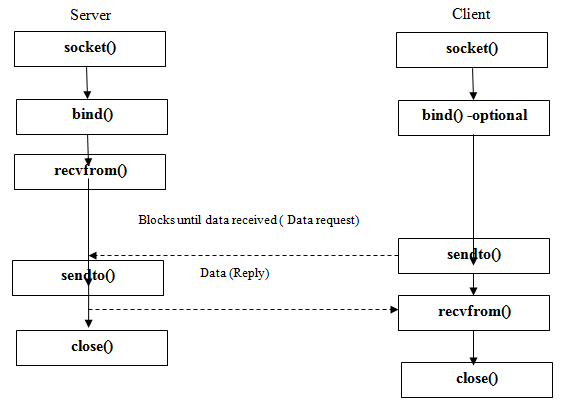
a. Client Design
Some of the header files that will be used in the socket programming are
- #include <stdio.h> This header file contains declarations used in most input and output and is typically included in all C programs.
- #include <sys/types.h> This header file contains definitions of a number of data types used in system calls. These types are used in the next two include files.
- #include <sys/socket.h> The header file socket.h includes a number of definitions of structures needed for sockets.
- #include <netinet/in.h> The header file in.h contains constants and structures needed for internet domain addresses.
- #include <unistd.h> The <unistd.h> header defines miscellaneous symbolic constants and types, and declares miscellaneous functions.
- #include<stdlib.h> Applications shall define the appropriate feature test macro (see the System Interfaces volume of IEEE Std 1003.1-2001) to enable the visibility of these symbols in this header.
- #include <string.h> This header is used to use some features of string and to use some functions needed for string manipulation like strcmp() etc.
- #include “vector.h” this is the custom vector data structure created by me to hold the bytes so that the same can be sent in batches.
- #include <arpa/inet.h> This header contains the definitions of the internet operations.
void diep(char *s)
{
perror(s);
exit(1);
}
This function is called when a system call fails. It displays a message about the error on stderr and then aborts the program.
I am reading the bytes from a text file and the text file and for this I have written a function which takes the filename and the byte size to read from the file as parameter.
vector *readFile(char *fileName,int bytesize )
FILE *file;
vector *dataHolder = vector_create(1000*sizeof (char*),0);
char *code = malloc(10000 * sizeof(char)); “file” is File descriptor and this variable is used to store the file information.“ dataHolder” is the vector variable to store the bytes read. “code” is the character variable to store the byte that it reads from the text file.
file = fopen(fileName, “r”);
logFile = fopen(“udp_assignment_client.log”, “a+”);
int i = 0;/* number of characters seen */
printf(“\n starting reading file”);
while(1)
{
code[i++] = (char)fgetc(file);//read the bytes from the file
code[i] = ”;
vector_insert(dataHolder,code,i-1);
if((code[i-1]==EOF)||(i-1==bytesize))
{
break;
}
usleep(5000);
}
In this function I am reading the text file to byte by byte and storing the same in a vector till bytesize of characters are read. Also I am providing 5 milliseconds of sleep between subsequent byte of reading the file. This is similar to byte generation.
int main(void)
{
struct sockaddr_in si_other;
A sockaddr_in is a structure containing an internet address. This structure is defined in netinet/in.h char *code = malloc(10000 * sizeof(char));
The client code reads the bytes from the file to send to the server and stores in the buffer “code”.
if ((s=socket(AF_INET, SOCK_DGRAM, IPPROTO_UDP))==-1)
diep(“socket”);The socket() system call creates a new socket. It takes three arguments.
The first is the address domain of the socket. There are two possible address domains, the UNIX domain for two processes which share a common file system, and the Internet domain for any two hosts on the Internet. The symbol constant AF_UNIX is used for the former and AF_INET for the later (there are actually many other options which can be used here for specialized purposes).
The second argument is the type of socket. There are two choices here, a stream socket in which characters are read in a continuous stream as if from a file or pipe, and a datagram socket, in which messages are read in chunks. The two symbolic constants are SOCK_STREAM and SOCK_DGRAM.
The third argument is the protocol. If this argument is zero (and it always should be except for unusual circumstances), the operating system will choose the mostappropriate protocol. It will choose TCP for stream sockets and UDP for datagram sockets. Here I have chosen UDP
The socket system call returns an entry into the file descriptor table (i.e. a small integer). This value is used for all subsequent references to this socket. If the socket call fails, it returns -1.In this case the program displays an error message and exits. However, this system call is unlikely to fail.
This is a simplified description of the socket call; there are numerous other choices for domains and types, but these are the most common. The socket() man page has more information. memset((char *) &si_other, 0, sizeof(si_other)); The function memset () sets all values in a buffer to zero. It takes three arguments, the first is a pointer to the buffer the second is what value you want to set it to initially and we are zeroing it and the third argument is the size of the buffer. Thus, this line initializes si_other to zeros. si_other.sin_family = AF_INET; The variable si_other is a structure of type struct sockaddr_in. This structure has four fields. The first field is short sin_family, which contains a code for the address family. It should always be set to the symbolic constant AF_INET as it is for the internet domain. si_other.sin_port = htons(PORT); The second field of si_other is unsigned short sin_port, which contain the port number. Here the macro PORT is of value 9930. However, instead of simply copying the port number to this field, it is necessary to convert this to network byte order using the function htons() which converts a port number in host byte order to a port number in network byte order.bytesSent = sendto(s, code, BUFLEN, 0, &si_other, slen);
if( bytesSent == -1)
diep(“sendto()”); To send a datagram, the function sendto() is used. This takes six arguments. The first three are the same as for a write() call, the socket file descriptor, the buffer from which the message will be written, and the number of bytes to write. The fourth argument is an int argument called flags, which is normally zero. The fifth argument is a pointer to a sockadd_in structure. This will contain the address to which the message will be sent. The last argument is the size of this structure. Note that this is not a pointer to an int, but an int value itself. The sendto() return -1 upon unsuccessful call and at that time the system displays an error and exits. Server Design#include <arpa/inet.h>
#include <netinet/in.h>
#include <stdio.h>
#include <sys/types.h>
#include <sys/socket.h>
#include <unistd.h>
# include <stdlib.h>
# include <time.h>
#include <string.h>
The header files are the same as for the client.
void diep(char *s)
{
perror(s);
exit(1);
}
int main(void)
{
struct sockaddr_in si_me, si_other;
The diep () function is identical to that in the client, as are the variables si_other and other variables. The variable si_me will contain the address of the server to which we want to connect. It is of type struct sockaddr_in.
if ((s=socket(AF_INET, SOCK_DGRAM, IPPROTO_UDP))==-1)
diep(“socket”);
memset((char *) &si_me, 0, sizeof(si_me));
si_me.sin_family = AF_INET;
si_me.sin_port = htons(PORT);
si_me.sin_addr.s_addr = htonl(INADDR_ANY);
if (bind(s, &si_me, sizeof(si_me))==-1)
diep(“bind”);
All the codes are same as that in the client except the variable si_me which is a structure of type struct sockaddr_in. This structure has four fields and all the fields will have the same value as in the client except the fourth field sin_addr.s_addr. This field of sockaddr_in is a structure of type struct sin_addr which contains only a single field unsigned long s_addr. This field contains the IP address of the host. For server code, this will always be the IP address of the machine on which the server is running, and there is a symbolic constant INADDR_ANY which gets this address. However, instead of simply copying the IP address to this field, it is necessary to convert this to network byte order using the function htonl() which converts a port number in host byte order to a port number in network byte order.
if (recvfrom(s, buf, BUFLEN, 0, &si_other, &slen)==-1)
{
diep(“recvfrom()”);
}
Servers using datagram sockets do not use the listen() or the accept() system calls. After a socket has been bound to an address, the program calls recvfrom() to read a message. This call will block until a message is received. The recvfrom() system call takes six arguments. The first three are the same as those for the read() call, the socket file descriptor, the buffer into which the message will be read, and the maximum number of bytes. The fourth argument is an integer argument for flags. This is ordinarily set to zero. The fifth argument is a pointer to a sockaddr_in structure. When the call returns, the values of this structure will have been filled in for the other end of the connection (the client). The size of this structure will be in the last argument, a pointer to an integer. This call returns the number of bytes in the message. (or -1 on an error condition). In case of error condition the system prints the error message and exits.
Enhancement to include time stamps
Client Side
To calculate the time for the time stamp I have defined a method timestring() which will return the formatted time string when called in whichever part of the code.
char* timestring()
{
# define TIME_SIZE 60
const struct tm *tm;
size_t len;
size_t bytesSent;
time_t now;
char *s;
char buffer[60];
struct timeval curTime;
The header file to be used for the time stamp is
#include <time.h>: This defines the timeval structure that includes at least the following members:
time_t tv_sec seconds
suseconds_t tv_usec microseconds
Variable “now” is of type time_t which will hold the current local time. “curTime” is of type timeval struct.
gettimeofday(&curTime, NULL);
int milli = curTime.tv_usec / 1000;
The system’s notion of the current Greenwich time and the current time zone is obtained with the gettimeofday() call. curTime is the timeval struct which specifies a time value in seconds and microseconds. I am getting the current time using this function and to get the exact milliseconds I am dividing the tv_usec field of the timeval struct by 1000.
now = time ( NULL );
tm = localtime ( &now );
I am using the method localtime() which uses the time pointed by timer to fill a tm structure with the values that represent the corresponding local time. This method returns the tm structure
len = strftime (buffer, TIME_SIZE, “%d %B %Y %H:%M:%S”, tm );
The strftime() function formats the broken-down time tm according to the format specification format and places the result in the character array buffer of size TIME_SIZE which is 60.The format specification is a null-terminated string and may contain special character sequences called conversion specifications, each of which is introduced by a ‘%’ character and terminated by some other character known as a conversion specified character. All other character sequences are ordinary character sequences.
sprintf(s,”%s:%d”,buffer,milli);
To put milliseconds in the time string for the timestamp I have used sprintf() to combine the buffer string and the milliseconds in integer type as a string and the formatted result is now stored in char* s which is of size TIME_SIZE i.e. 60.
FILE *file,*log;
log = fopen(“udp_assignment_client.log”, “a+”);
The type FILE is used for a file variable and is defined in the stdio.h file. It is used to define a file pointer (here I used *log) for use in file operations. fopen() function opens the file whose name is the string ‘udp_assignment_client.log” for client and “udp_assignment_server.log” for server and associates a stream with it. The argument mode is a+ which opens the file for reading and appending (writing at end of file). The file is created if it does not exist. The initial file position for reading is at the beginning of the file, but output is always appended to the end of the file .#define LOG(lf, msg) fprintf(lf, “user: %d: %s\n”, getuid(), (msg))
I have defined the macro LOG which takes the FILE pointer and the string buffer that needs to be printed. The fprintf() function shall place output on the named output stream and here it will be the file being pointed to by the lf file pointer.
sprintf(logBuffer, “%s :Client Side :Received time of packets of size %d received in server side as %d seconds and %ld nanoseconds\n”,c_timestring,byteSize,end_Time.tv_sec,end_Time.tv_nsec);
LOG(log,logBuffer);
To time stamp the byte generated at the client side and bytes received at the server side I am putting the formatted string that needs to be logged in the logBuffer of char array of size 5120 and then I am calling the macro LOG with the file pointer log and the logBuffer.
Server Side
All the codes are same as that in the client for time stamp logging except the log file name is udp_assignment_server.log.
Test Case development and Testing
To test my program I have chosen the following configuration: UBUNTU 10 in VM Ware virtual machine with 2GB RAM to virtual machine. The virtual machine was running on the Windows 7 Home premium with 4GB ram and it has the Intel Core 2 Duo processor of speed 2.4GHz.
I have used a char.txt file which contains some text file. I am reading this file character by character to generate bytes in the client side. I have used the vector.c to hold the byte that get generated so that I can transfer the same batch wise instead of sending the bytes as and when generated. . I have first compiled the vector files as
follows gcc -c vector.c vector.h in a terminal window .The vector.c will generate the vector.o file which is the executable file.
To run the server program I opened up a terminal window and went upto the location where the server_udp.c file is located. I compiled my server program which is written in the file server_udp.c using the command gcc -o server_udp server_udp.c –lrt. This produced the server_udp executable. To run it I used. /server_udp command in the same terminal window to run the program. The program will wait for the bytes to get generated.
Similarly, I need to compile the client program. But client program uses vector.c to store the bytes generated. Therefore to compile the client program I opened up another terminal window other than the terminal where the server program is running and use the vector.o executable while compiling the client_udp.c , and this I did by using the command line as gcc -std=gnu99 -o client_udp client_udp.c vector.o –lrt . –lrt should be used as I had used various time.h functions like clock_gettime() etc and for struct like timespec. The compilation of client_udp.c file will give the client_udp executable file. So to run it i had used the command ./ client_udp in the same terminal window where the client_udp.c was compiled. In the client program I am asking user to select among 3 options. Option 1 needs to be selected if the user wants to send the data as and when it is generated. Option 2 needs to be selected if the user wants to send the data batch wise and it is for PART C of the assignment and option 3 needs to be selected when the user wants to exist. When the user selects option1 I am sending the bytes as soon as it is generated and logging the byte generation with time stamp from the client side in the file udp_assignment_client.log and in the server side I am also logging the byte received by the server with the time stamp in the file udp_assignment_server.log. Now I will show the test cases of vector file, and the main client server file. Note: For the program to run the char.txt file which will contain the data to get generated must be present in the same location where the executable files are present.
Client Server Delay Measurement System
Average Delay calculation
To calculate the average time delay per data byte it is essential to calculate the time of generation of bytes and the total end time of the server receiving the packet of particular byte size. And the time delay can be calculated by subtracting the start time of generation of byte in client side from the receiving time of the packet by the server. In the client program , client_udp.c in our case, the time of generation I am calculating when the byte character is read from the file. struct timespec start,totalStart,averageTime,averageEndTime;
start,totalStart,averageTime,averageEndTime are the global variables to hold the timespec struct .
The structure timespec is present in the <time.h> header file, which has at least the following members:time_t tv_sec for seconds and long tv_nsec for nanoseconds.
while(1)
{
code[i++] = (char)fgetc(file);
code[i] = ”;
vector_insert(dataHolder,code,i-1);
if((code[i-1]==EOF)||(i-1==bytesize))
{
break;
}
clock_gettime(CLOCK_MONOTONIC_RAW,&start);
totalStart.tv_sec+= start.tv_sec;
totalStart.tv_nsec+= start.tv_nsec;
As and when the bytes are generated I have used clock_gettime() to populate the start struct with the time . The functions clock_gettime() retrieve the time of the specified clock clk_id. The clk_id argument is the identifier of the particular clock on which to act. A clock may be system-wide and hence visible for all processes, or per-process if it measures time only within a single process.I have used CLOCK_MONOTONIC_RAW as the clock_id.
CLOCK_MONOTONIC is the clock that cannot be set and represents monotonic time since some unspecified starting point. Similar to CLOCK_MONOTONIC; CLOCK_MONOTONIC_RAW provides access to a raw hardware-based time that is not subject to NTP adjustments. And then I am adding the seconds and nano seconds part of the struct start to the seconds and nano seconds part of the struct totalStart. If the end of file is reached or if the function had read the required number of bytesize of data as set by the user then
averageTime.tv_sec = totalStart.tv_sec/bytesize;
averageTime.tv_nsec = totalStart.tv_nsec/bytesize;
I have calculated the average time of generation per byte data by dividing the totalStart by bytesize .
if (recvfrom(s, buf, BUFLEN, 0, &si_other, &slen)==-1)
{
diep(“recvfrom()”);
}
else
{
clock_gettime(CLOCK_MONOTONIC_RAW,&end);
c_timestring = timestring();
sprintf(logBuffer,”%s :Server Side :Received packet %s\n”,c_timestring,buf);
LOG(log,logBuffer);
//Sending the time of receipt of packets
bytesSent = sendto(s, &end, (int)sizeof(end), 0, &si_other, slen);
if( bytesSent == -1)
diep(“sendto() error in server side while sending the time of receipt”);
}
Similarly I have calculated the time of the bytes that are received on the server and storing it in the end variable using the clock_gettime() and have sent the end time in the variable end to the client.
/* Receive endtime for each byte*/
if (recvfrom(s, (struct timespec *)&end_Time, (int)sizeof(end_Time), 0, &si_other, &slen) == -1)
{
diep(“recvfrom() in client side”);
}else
{
totalEnd_Time.tv_sec+= end_Time.tv_sec;
totalEnd_Time.tv_nsec+= end_Time.tv_nsec;
sprintf(logBuffer, “%s :Client Side :Received time of packets of size %d received in server side as %d seconds and %ld nanoseconds\n”,c_timestring,byteSize,end_Time.tv_sec,end_Time.tv_nsec);
LOG(log,logBuffer);
}
At the client side I have received the receive time of bytes sent by the server in the end_time variable and adding it to the totalEnd_Time variable.
averageEndTime.tv_sec = totalEnd_Time.tv_sec/byteSize;
averageEndTime.tv_nsec = totalEnd_Time.tv_nsec/byteSize;
sprintf(logBuffer, “%s :Average End Time of packet of size %d received in server side is as %d seconds and %ld nanoseconds\n”,c_timestring,byteSize,averageEndTime.tv_sec,averageEndTime.tv_nsec);
LOG(log,logBuffer); Then I have calculated the average end time by dividing the totalEnd_Time by the byte size. time_delay = diff(averageTime,averageEndTime); The time delay is calculated by sending the averageTime ( average start time of byte generation ) and averageEndTime ( average end time of the bytes received by the server) to the function diff() as arguments or function parameters.
struct timespec diff(struct timespec start, struct timespec end)
{
struct timespec temp;
if (start.tv_nsec < end.tv_nsec)
{
int adj = (end.tv_nsec – start.tv_nsec) / (1000000000) + 1;
end.tv_nsec -= (1000000000) * adj;
end.tv_sec += adj;
}
if (start.tv_nsec – end.tv_nsec > (1000000000))
{
int adj = (start.tv_nsec – end.tv_nsec) / (1000000000);
end.tv_nsec += (1000000000) * adj;
end.tv_sec -= adj;
}
temp.tv_sec = end.tv_sec – start.tv_sec;
temp.tv_nsec = end.tv_nsec – start.tv_nsec;
return temp;
}
This diff() calculates the time difference and the function return the time difference in struct timespec.
timedelayInMilliSec = (time_delay.tv_sec * 1000)+(time_delay.tv_nsec/1000000.0);
The time in milliseconds is found out by converting the timespect struct which have element tv_sec ( time in seconds) and tv_nsec (time in nano seconds) to milliseconds.
Experimental runs and Logging
To calculate the average delay per byte of varied byte size, I have read the char.txt file to generate the bytes.
In the client program when the user selects option 1 for sending the bytes as and when generated to the server then the
time_delay = diff(start,end_Time);
client program send the bytes as and when generated and calculates the time delay by subtracting the end_time from the start and converting the same to milliseconds as per the procedure mentioned above.
timedelayLogSingleTransmission = fopen(“timeDelay_Log_singlebyteTrans.log”,”a+”);
To log the time delay I have opened a file with name timeDelay_Log_singlebyteTrans.log using fopen() in append mode.
sprintf(logBuffer, “%s :Client Side :Time delay (single byte transmission)for %d packet size is %lf milliseconds \n”,c_timestring,strlen(code),timedelayInMilliSec);
I then copied the desired string with packet size and time delay in milliseconds to logBuffer which is char[5120] using sprintf().
LOG(timedelayLogSingleTransmission,logBuffer);
To log the desired string that is in the logBuffer I have used the macro LOG , and the functionality of which is already mentioned in PART B of the assignment.
Similarly in the client program when the user selects option 2 for sending the bytes by accumulating these in a packet of particular size and then transmitting the packet to the server instead of sending the bytes as and when it is getting generated, I have read the bytes from char.txt file. Here I created a packet of size 1 byte and sent it to the server and subsequently I increased the packet size by 10 bytes. dataHolder = readFile(“char.txt”,byteSize);
To achieve this functionality I have sent the file name (char.txt) from where the bytes to be generated and the size of the packet to be created to the function readFile() as string argument. This function returns a vector of char* of desired byte size.
vector *dataHolder = vector_create(sizeof (char*),0) ;
Here dataHolder is the vector of char* that will hold the data bytes of particular size and it is created by calling the vector_create() of vector.c . In the readFile() I am reading the bytes from the char.txt file and storing it in a vector of desired size and returning the vector of char* . This is the packet of desired size to be transmitted. During the byte generation I have calculated the average time per data byte as per the procedures mentioned above.
for(i=0;i<byteSize;i++){
data = (char*)vector_at(dataHolder,i);
bytesSent = sendto(s, data, BUFLEN, 0, &si_other, slen);
As soon as the packet of desired byte size is generated I have extracted the character stored in the vector using the vector_at() and transmitted the data to the server using sendto(). In the server side the data is received and the time of receiving is noted and the time is sent to the client using sendto() . The end time is received in the client by using recvfrom() and as mentioned in section 3.1 the average time delay per data byte is calculated .timedelayLogbatchTransmission = fopen(“timeDelay_BatchTransmissionLog2.log”,”a+”);
To log the time delay I am opening a file with name timeDelay_BatchTransmissionLog2.log using fopen() in append mode.
sprintf(logBuffer, “%s :Client Side :Time delay (batch wise transmission)for %d pacekt size is %lf milliseconds\n”,c_timestring,byteSize,timedelayInMilliSec);
I have copied the desired string with packet size and time delay in milliseconds to logBuffer which is char[5120] using sprintf().
LOG(timedelayLogbatchTransmission,logBuffer);
To log the desired string that is in the logBuffer I have used the macro LOG , and the functionality of which is mentioned in PART B of the assignment.
byteSize+=1;
vector_clear(dataHolder);
printf(“\n now the byte size will be %d”,byteSize);
if(byteSize > 1000)
{
break;
}
I then increased the byteSize by 10 and repeated the above procedure and logs the time delay in the log file. This procedure continues till the byteSize is of 1000 is reached.
close(s);
fclose(file);
fclose(log);
fclose(timedelayLogbatchTransmission);
fclose(timedelayLogSingleTransmission);
At the end of the program execution I have closed the socket by close() and the files by fclose().
The log file of time delay that got generated is as follows:
user: 1000: 06 November 2012 11:10:39:706 :Client Side :Time delay (batch wise transmission)for 1 pacekt size is 8.079522 milliseconds
user: 1000: 06 November 2012 11:10:39:722 :Client Side :Time delay (batch wise transmission)for 2 pacekt size is 10.722577 milliseconds
Analysis and justification of trends
First I have made a batch size of 1 byte and subsequently I increased the byte size by 10 byte i.e. (run1 = 1,run2 = 11,…run101 = 1001) and calculated the time delay and plotted the graph by transferring the data collected to MS Excel file.
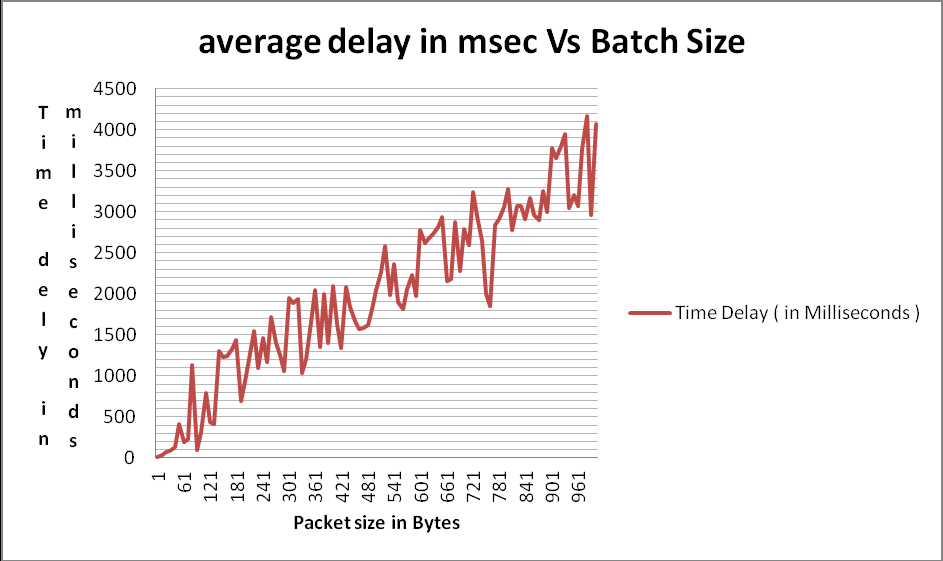
From the points it was evident that the delay of 128 can be between 31 to 41 bytes of batch.
So next I started to calculate the time delay starting from batch size of 1 and subsequently increased the byte size by 40 (run1 = 1, run2=41,… run26 = 1001) and then plotted the graph.
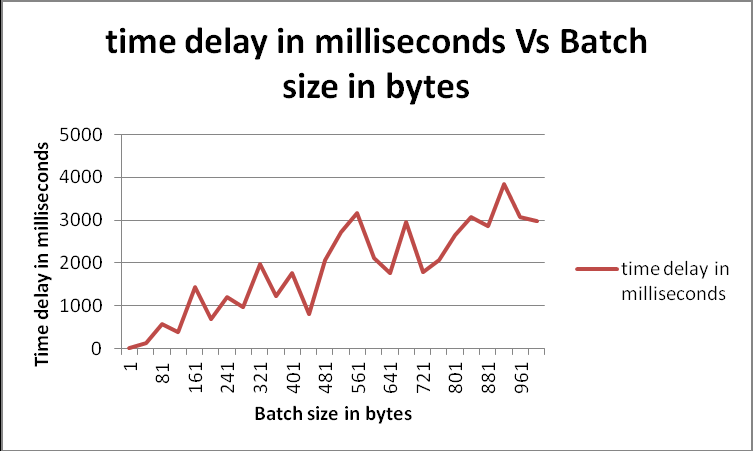
From the plot it was evident that the delay of 128ms would be between batch size of 38 to 41.
So I narrowed down the search to find the ideal batch size to introduce a delay of 128 milliseconds. So I started to calculate the time delay starting from batch size of 1 and subsequently increased the byte size by 38 (run1 = 1,run2=39,… run27=989) and then plotted the graph
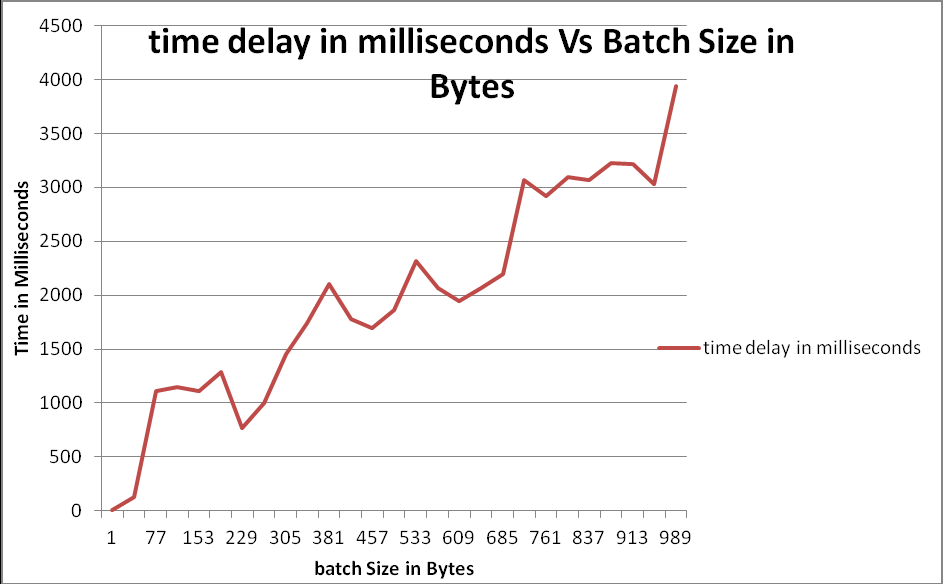
So from the plot I reached more closer to the result and narrowed down the search of the answer between two batch size. So it was clear that the 128ms of delay can happen if the batch size is between 39 to 41. But earlier we found that the batch size of 39 took 126 milliseconds and the batch size of 41 took 131 milliseconds ,so the average delay of 128 milliseconds would come if the batch size is 40 (run1 = 1,run2=40,…run26=976). So again I started to calculate the time delay starting from batch size of 1 and subsequently increased the byte size by 39 and then plotted the graph.
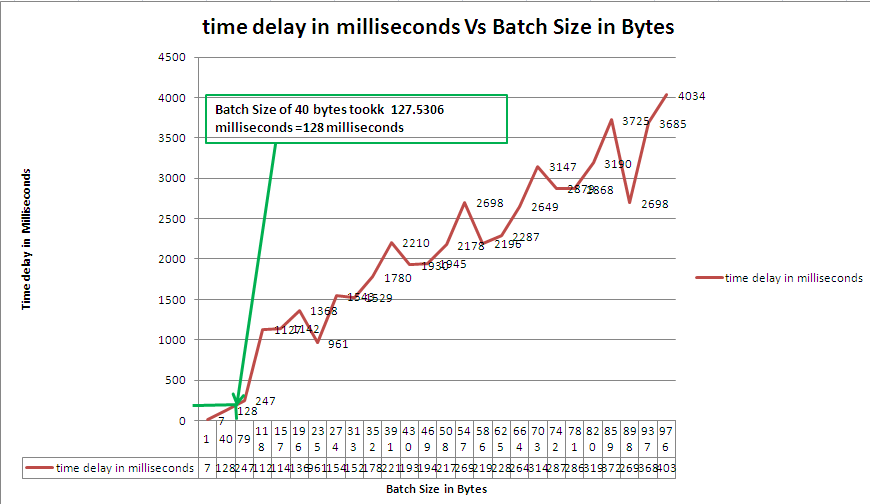
Form the graph it is concluded that udp has no flow control. For some packet size the delay increases even for small packet size and also it is seen that the delay is less for a big packet size. Also the variation might also be due to the processes running in a system and so the OS gives priority to whom on that particular time.
Optimum batch Size and Fragmentation Efficiency
From the plot it was clear that for a maximum possible delay of 128 milliseconds the optimum batch size is 40bytes. If we make 40 bytes of packet to transfer 1000 bytes of data then we need to transfer total of 25 packets of 40 bytes each. For 40 bytes it takes 128 milliseconds then for 1 byte it will take 3.2 milliseconds. Fragmentation efficiency when zero packets dropped is 100%.
References
________________________________________________________________________________
[1] Chen, W.H. and Way, W.I.(2004) “Multichannel single-sideband SCM/DWDM transmission systems,” IEEE J LightwaveTech (V 7),p.22, 1679-1693 .
[2] Goel,A.,Sethi,R.K.”Integrated Optical Wireless Network For Next Generation Wireless Systems”,Signal Processing: An International Journal (SPIJ),(V 3) : Issue (1).
[3] Hartmann,P., Webster,M., Wonfor,A., Ingam,J.,D.,Penty,R.,V.,White,I.H.,Wake,D.,and Seeds,A.,J.( 2003) “Low-Cost Multimode Fiber-based Wireless LAN Distribution Systems Using Uncooled, Directly Modulated DFB Laser Diodes”, in Proceedings of the ECOC’03,(V 3),p.804,(804 – 805).
[4] Kim,H.B.(2005)”Radio over Fiber based Network Architecture”.
[5] Kurniawan, T., Nirmalathas, A., Lim, C., Novak, D., and Waterhouse R.(2006) “Performance analysis of optimized millimeter-wave fiber radio links”, IEEE Trans. Microwave Theory and Techniques,(V 2),p.56, 921-928 .
[6] O’Reilly,J.,J., Lane,P.,M., and Capstick,M.,H.(1995) “Optical Generation and Delivery of Modulated mm-waves for Mobile Communications”, in Analogue Optical Fibre Communications,:The Institute of Electrical Engineers, London.
[7] Powell,A.(2002) “Radio over Fiber Technology: Current Applications and Future Potential in Mobile Networks – Advantages and Challenges for a Powerful Technology” in Radio over Fiber Technologies for Mobile Communications Networks”:Artech House, Inc, USA.
[8] Schmuck, H.(1995)“Comparison of optical millimeter-wave system concepts with regard to chromatic dispersion”Electron. Lett. (V 21),p.31, 1848-1849 .
[9] Verlag,J.J.2010″Optical generation of mm-wave signal for use in broadband radio over fibre systems”,VOGT.
[10] Wake,D.(2002)“Radio over Fiber Systems for Mobile Applications in Radio over Fiber Technologies for Mobile Communications Networks”:Artech House, Inc, USA.
[11] Wake,D.,Dupont,S., Vilcot,J.,P. and Seeds,A.,J.( 2001) “32-QAM Radio Transmission Over Multimode Fibre Beyond the Fibre Bandwidth”:IEEE International Topical Meeting on Microwave Photonics (MWP’01).
[12] Zyga,L. (March 9 2012) “Fiber-wireless (Fi-Wi) to provide ultra-high-speed, short-range communication” [Online]. Available from:http://phys.org/news187346128.html (Accessed: 06 November 2012).
Code:
Client Program (client_udp.c)
/*-
/* Copyright 2012-2022 Anshuman Biswal
* All rights reserved.
* This is the client program using UDP and it was written as part of assignment for module 3 for MSC Engg course in the *
* module SPC2517
* Name: Anshuman Biswal
* ROLL: CJB0412001
*/
#include <arpa/inet.h>
#include <netinet/in.h>
#include <stdio.h>
#include <sys/types.h>
#include <sys/socket.h>
#include <unistd.h>
# include <stdlib.h>
# include <time.h>
#include <string.h>
#include “vector.h”
#define BUFLEN 1000
#define NPACK 10
#define PORT 9930
#define LOG(lf, msg) fprintf(lf, “user: %d: %s\n”, getuid(), (msg))
#define LOGTIMEDELAY(lf, msg) fprintf(lf, “%s\n”,(msg))
const int NANO_SECONDS_IN_SEC = 1000000000;
struct timespec start,totalStart,averageTime,averageEndTime;
void diep(char *s)
{
perror(s);
exit(1);
}
char* timestring()
{
# define TIME_SIZE 60
const struct tm *tm;
size_t len;
size_t bytesSent;
time_t now;
char *s;
char buffer[60];
struct timeval curTime;
gettimeofday(&curTime, NULL);
int milli = curTime.tv_usec / 1000;
now = time ( NULL );
tm = localtime ( &now );
s = malloc ( TIME_SIZE * sizeof ( char ) );
len = strftime (buffer, TIME_SIZE, “%d %B %Y %H:%M:%S”, tm );
sprintf(s,”%s:%d”,buffer,milli);
return s;
# undef TIME_SIZE
}
vector *readFile(char *fileName,int bytesize)
{
FILE *file,*logFile;
vector *dataHolder = vector_create(1000*sizeof (char*),0);
char logBuffer [5120];
memset(&totalStart, 0, sizeof(totalStart));
char *code = malloc(10000 * sizeof(char));
int averageSeconds;
long averageNanoseconds;
file = fopen(fileName, “r”);
logFile = fopen(“udp_assignment_client.log”, “a+”);
int ch;
int i = 0;/* number of characters seen */
//printf(“\n starting reading file”);
while(1)
{
code[i++] = (char)fgetc(file);
code[i] = ”;
vector_insert(dataHolder,code,i-1);
if((code[i-1]==EOF)||(i-1==bytesize))
{
break;
}
//clock_gettime(CLOCK_PROCESS_CPUTIME_ID,&start);
clock_gettime(CLOCK_MONOTONIC_RAW,&start);
totalStart.tv_sec+= start.tv_sec;
totalStart.tv_nsec+= start.tv_nsec;
usleep(5000);
}
averageTime.tv_sec = totalStart.tv_sec/bytesize;
averageTime.tv_nsec = totalStart.tv_nsec/bytesize;
sprintf(logBuffer, “Client Side :Average time of bytes of a total of %d size packet is %d seconds and %ld nanoseconds\n”,bytesize,averageTime.tv_sec,averageTime.tv_nsec);
LOG(logFile,logBuffer);
fclose(file);
fclose(logFile);
return dataHolder;
}
double diff(struct timespec start, struct timespec end)
{
double starttimeinMS,endTimeinMS,diffTimeinMS;
if (start.tv_nsec < end.tv_nsec)
{
int adj = (end.tv_nsec – start.tv_nsec) / (1000000000) + 1;
end.tv_nsec -= (1000000000) * adj;
end.tv_sec += adj;
}
if (start.tv_nsec – end.tv_nsec > (1000000000))
{
int adj = (start.tv_nsec – end.tv_nsec) / (1000000000);
end.tv_nsec += (1000000000) * adj;
end.tv_sec -= adj;
}
starttimeinMS = (start.tv_sec * 1000)+(start.tv_nsec/1000000.0);
endTimeinMS = (end.tv_sec*1000)+( end.tv_nsec/1000000.0);
diffTimeinMS = (double)(endTimeinMS-starttimeinMS);
return diffTimeinMS;
}
#define SRV_IP “127.0.0.1”
int main(void)
{
struct sockaddr_in si_other;
int s, i=0;
int slen=sizeof(si_other);
int ch;
int byteSize = 1;
size_t bytesSent;
char *code = malloc(10000 * sizeof(char));
char *data;
char logBuffer [5120];
char *c_timestring;
int randomNumber;
struct timespec end_Time,totalEnd_Time,time_delay;
double timedelayInMilliSec;
int choice;
FILE *file,*log,*timedelayLogSingleTransmission,*timedelayLogbatchTransmission;
struct timespec time1, time2;
if ((s=socket(AF_INET, SOCK_DGRAM, IPPROTO_UDP))==-1)
diep(“socket”);
memset((char *) &si_other, 0, sizeof(si_other));
si_other.sin_family = AF_INET;
si_other.sin_port = htons(PORT);
printf(“\n enter choice:”);
printf(“\n 1: to send byte by byte data as it is”);
printf(“\n 2: to send data batch wise”);
printf(“\n 3: to exit\n”);
scanf(“%d”, &choice);
while(1)
{
switch(choice)
{
case 1:
{
file = fopen(“char.txt”, “r”);
log = fopen(“udp_assignment_client.log”, “a+”);
timedelayLogSingleTransmission = fopen(“timeDelay_Log_singlebyteTrans.log”,”a+”);
while(1)
{
code[i++] = (char)fgetc(file);
//printf(“\n byte read code is %s”,code);
//clock_gettime(CLOCK_PROCESS_CPUTIME_ID,&start);
clock_gettime(CLOCK_MONOTONIC_RAW,&start);
bytesSent = sendto(s, code, BUFLEN, 0, &si_other, slen);
if( bytesSent == -1)
diep(“sendto()”);
else
{
c_timestring = timestring();
sprintf(logBuffer, “%s :Client Side :Sending packet %s of size %d\n”,c_timestring,code,strlen(code));
LOG(log,logBuffer);
}
/* Receive endtime for each byte*/
if (recvfrom(s, (struct timespec *)&end_Time, (int)sizeof(end_Time), 0, &si_other, &slen) == -1)
{
diep(“recvfrom() in client side”);
}else
{
sprintf(logBuffer, “%s :Client Side :Received time of packets of size %d received in server side as %d seconds and %ld nanoseconds\n”,c_timestring,byteSize,end_Time.tv_sec,end_Time.tv_nsec);
LOG(log,logBuffer);
//end_Time.tv_sec+=start.tv_sec;
//end_Time.tv_nsec+=start.tv_nsec;
timedelayInMilliSec = diff(start,end_Time);
//timedelayInMilliSec = (time_delay.tv_sec * 1000)+(time_delay.tv_nsec/1000000.0);
sprintf(logBuffer, “%s :Client Side :Time delay (single byte transmission)for %d packet size is %lf milliseconds \n”,c_timestring,strlen(code),timedelayInMilliSec);
//printf(“Client Side :Time delay for %d packet size is %lf milliseconds\n”,byteSize,timedelayInMilliSec);
LOG(timedelayLogSingleTransmission,logBuffer);
}
if((code[i-1]==EOF)||(i==1000))
{
fclose(file);
break;
}
usleep(5000);
}
}break;
case 2:
{
//printf(“\n sending packet batch wise starting with 1 byte size”);
log = fopen(“udp_assignment_client.log”, “a+”);
timedelayLogbatchTransmission = fopen(“timeDelay_BatchTransmissionLog2.log”,”a+”);
vector *dataHolder = vector_create(sizeof (char*),0) ;
while(1)
{
dataHolder = readFile(“char.txt”,byteSize);
memset(&totalEnd_Time, 0, sizeof(totalEnd_Time));
for(i=0;i<byteSize;i++)
{
data = (char*)vector_at(dataHolder,i);
bytesSent = sendto(s, data, BUFLEN, 0, &si_other, slen);
if( bytesSent == -1)
diep(“sendto()”);
else
{
c_timestring = timestring();
sprintf(logBuffer, “%s :Client Side :Sending packet %s of size %d\n”,c_timestring,data,strlen(data));
LOG(log,logBuffer);
}
/* Receive endtime for each byte*/
if (recvfrom(s, (struct timespec *)&end_Time, (int)sizeof(end_Time), 0, &si_other, &slen) == -1)
{
diep(“recvfrom() in client side”);
}else
{
totalEnd_Time.tv_sec+= end_Time.tv_sec;
totalEnd_Time.tv_nsec+= end_Time.tv_nsec;
sprintf(logBuffer, “%s :Client Side :Received time of packets of size %d received in server side as %d seconds and %ld nanoseconds\n”,c_timestring,byteSize,end_Time.tv_sec,end_Time.tv_nsec);
LOG(log,logBuffer);
}
}
averageEndTime.tv_sec = totalEnd_Time.tv_sec/byteSize;
averageEndTime.tv_nsec = totalEnd_Time.tv_nsec/byteSize;
//averageEndTime.tv_sec+=averageTime.tv_sec;//Since the byte took the averageTime to get generated
//averageEndTime.tv_nsec+=averageTime.tv_nsec;
sprintf(logBuffer, “%s :Average End Time of packet of size %d received in server side is as %d seconds and %ld
nanoseconds\n”,c_timestring,byteSize,averageEndTime.tv_sec,averageEndTime.tv_nsec);
LOG(log,logBuffer);
timedelayInMilliSec = diff(averageTime,averageEndTime);
//printf(“\n%s :Client Side :Time delay for %d pacekt size is %d seconds and %ld nanoseconds\n”,c_timestring,byteSize,time_delay.tv_sec,time_delay.tv_nsec);
/*converting seconds and nano seconds to milli seconds*/
//timedelayInMilliSec = (time_delay.tv_sec * 1000)+(time_delay.tv_nsec/1000000.0);
sprintf(logBuffer, “%s :Client Side :Time delay (batch wise transmission)for %d pacekt size is %lf milliseconds\n”,c_timestring,byteSize,timedelayInMilliSec);
//sprintf(logBuffer, “%lf milliseconds”,timedelayInMilliSec);
//printf(“Client Side :Time delay for %d pacekt size is %lf milliseconds\n”,byteSize,timedelayInMilliSec);
LOG(timedelayLogbatchTransmission,logBuffer);
//LOGTIMEDELAY(timedelayLogbatchTransmission,logBuffer);
byteSize+=39;
vector_clear(dataHolder);
// printf(“\n now the byte size will be %d”,byteSize);
if(byteSize > 1001)
{
break;
}
}
fclose(log);
fclose(timedelayLogbatchTransmission);
}break;
case 3:
{
log = fopen(“udp_assignment_client.log”, “a+”);
data = “^C”;
bytesSent = sendto(s, data, BUFLEN, 0, &si_other, slen);
if( bytesSent == -1)
diep(“sendto()”);
else
{
c_timestring = timestring();
sprintf(logBuffer, “%s :Client Side :Sending packet %s of size %d\n”,c_timestring,data,strlen(data));
LOG(log,logBuffer);
}
fclose(log);
exit(0);
}break;
default:
{
printf(“\n enter choice:”);
printf(“\n 1: to send byte by byte data as it is”);
printf(“\n 2: to send data batch wise”);
printf(“\n 3: to exit\n”);
scanf(“%d”, &choice);
}break;
}
printf(“\n enter choice:”);
printf(“\n 1: to send byte by byte data as it is”);
printf(“\n 2: to send data batch wise”);
printf(“\n 3: to exit\n”);
scanf(“%d”, &choice);
}
return 0;
}
B. Server Program (server_udp.c)
/* Copyright 2012-2022 Anshuman Biswal
* All rights reserved.
* This is the client program using UDP and it was written as part of assignment for module 3 for MSC Engg course in the *
* mudule SPC2517
* Name: Anshuman Biswal
* ROLL: CJB0412001
*/
#include <arpa/inet.h>
#include <netinet/in.h>
#include <stdio.h>
#include <sys/types.h>
#include <sys/socket.h>
#include <unistd.h>
# include <stdlib.h>
# include <time.h>
#include <string.h>
#define BUFLEN 1000
#define NPACK 1000
#define PORT 9930
#define LOG(lf, msg) fprintf(lf, “user: %d: %s\n”, getuid(), (msg))
void diep(char *s)
{
perror(s);
exit(1);
}
char* timestring ( void )
{
# define TIME_SIZE 60
const struct tm *tm;
size_t len;
time_t now;
char *s;
char buffer[60];
struct timeval curTime;
gettimeofday(&curTime, NULL);
int milli = curTime.tv_usec / 1000;
now = time ( NULL );
tm = localtime ( &now );
s = malloc ( TIME_SIZE * sizeof ( char ) );
len = strftime (buffer, TIME_SIZE, “%d %B %Y %H:%M:%S”, tm );
sprintf(s,”%s:%d”,buffer,milli);
return s;
# undef TIME_SIZE
}
int main(void)
{
struct sockaddr_in si_me, si_other;
struct timespec end;
size_t bytesSent;
int s, i, slen=sizeof(si_other);
char buf[BUFLEN];
char logBuffer [5120];
char *c_timestring;
FILE *log = fopen(“udp_assignment_server.log”, “a+”);
if ((s=socket(AF_INET, SOCK_DGRAM, IPPROTO_UDP))==-1)
diep(“socket”);
memset((char *) &si_me, 0, sizeof(si_me));
si_me.sin_family = AF_INET;
si_me.sin_port = htons(PORT);
si_me.sin_addr.s_addr = htonl(INADDR_ANY);
if (bind(s, &si_me, sizeof(si_me))==-1)
diep(“bind”);
while(1)
{
if (recvfrom(s, buf, BUFLEN, 0, &si_other, &slen)==-1)
{
diep(“recvfrom()”);
}
else
{
//clock_gettime(CLOCK_PROCESS_CPUTIME_ID,&end);
clock_gettime(CLOCK_MONOTONIC_RAW,&end);
c_timestring = timestring();
sprintf(logBuffer,”%s :Server Side :Received packet %s\n”,c_timestring,buf);
LOG(log,logBuffer);
//Sending the time of receipt of packets
bytesSent = sendto(s, &end, (int)sizeof(end), 0, &si_other, slen);
if( bytesSent == -1)
diep(“sendto() error in server side while sending the time of receipt”);
else
{
c_timestring = timestring();
//printf(“Server Side Side :Sending time of receipt of packet as %d seconds and %ld nanaoseconds\n”,end.tv_sec,end.tv_nsec);
}
//printf(“Received packet %s\n”, buf);
}
if(strcmp(buf,”^C”)==0)
break;
}
close(s);
fclose(log);
return 0;
}
 TheIntRendz