
Home » Posts tagged 'class diagrams'
Tag Archives: class diagrams
Object Oriented Analysis of a software
Starts from the link Structured Analysis of a software
Object Oriented Analysis
3.1 Overview:
Another way of analysis modeling is called object-oriented analysis which focuses on the definition of classes and the manner in which they collaborate with one another to affect customer requirements. UML and the Unified Process are predominantly Object Oriented. The intent of Object Oriented Analysis (OOA) is to define all classes (and the relationships and behaviour associated with them that are relevant to the problem to be solved.
To accomplish this, a number of tasks must occur:
n Basic user requirements must be communicated between the customer and the software engineer.
n Classes must be defined.
n A class hierarchy is defined
n Object-to-object relationships should be represented.
n Object behaviour must be modelled.
n 1 – 5 are repeated iteratively until the model is complete.
OOA builds a class-oriented model that relies on an understanding of OO concepts.
n Classes and objects
n Attributes and operations
n Encapsulation and instantiation
n Inheritance
Object-Oriented thinking begins with the definition of a class, often defined as:
n template
n generalized description
n “blueprint” … describing a collection of similar items
n A meta class (also called a super class) establishes a hierarchy of classes once a class of items is defined, a specific instance of the class can be identified.
In this part of the assignment we will model a Badge Tracking System described in Part B of the assignment using Object Oriented approach.
3.2 Actors
- Teachers
- Therapist
- Students
- Admin
- Facility Personnel
- Security Personnel
- RFID Reader
3.3 Use Cases
- Ø Login and validation
- Ø Track activities performed
- Ø Track therapies
- Ø Add new record
- Ø Modify a record
- Ø Retrieve record
- Ø Delete Record
- Ø Monitor students/employees
- Ø View Logs
- Ø Manage Attendance
- Ø Swipe Card
3.4 Use Case Description
|
Use case name
|
Login and Validation |
|
Use case id |
UC_001 |
|
Actors |
Teachers, Therapist, Admin, Facility Personnel, Security Person |
|
Purpose |
To login to the AYS application |
|
Overview |
This case initiates from employee. To access the AYS tracking software, the employee needs to login. To get the login screen the user needs to double click the application executable. |
|
Pre-condition |
The employee should have access privilege to use the application |
|
Post-condition |
If the login is successful the user sees the home screen of their respective module that they are authorized to use |
|
Use case name |
Add New Record |
|
Use case Id |
UC_004 |
|
Actors |
Administrator, Server Admin |
|
Purpose |
It will be used by Administrator, Server Admin team to add student or employee details as a new student or employee record. |
|
Overview |
This case initiates from employee. After login is successful, the respective employee who can add new records uses this feature to add new records in the database. |
|
Pre-condition |
The employee should have access privilege to use the application. |
|
Post-condition |
The records get added to the database. |
|
Use case name |
Modify a record |
|
Use case Id |
UC_005 |
|
Actors |
Admin, Server Admin |
|
Purpose |
It will be used by server admin and administrator team to modify any student / employee details. |
|
Overview |
This case initiates from employee. After login is successful the server admin can check the student/employee details and can modify any details of any student or employee. |
|
Pre-condition |
The employee should have access privilege to use the application. |
|
Post-condition |
If the login is successful the user sees the home screen of their respective module that they are authorized to use i.e. the student’s details of therapies given to each student with total time of therapy given. |
|
Use case name |
Track Activities Performed |
|
Use case Id |
UC_002 |
|
Actors |
Teachers |
|
Purpose |
It will be used by teachers to track the activities performed by the student. |
|
Overview |
This case initiates from employee. After login is successful the teacher can check the student details of what all activities a particular has performed and he can also update any student’s activity details. |
|
Pre-condition |
The employee should have access privilege to use the application. |
|
Post-condition |
If the login is successful the user sees the home screen of their respective module that they are authorized to use i.e. the student’s details of activities performed by each student with time duration. |
|
Use case name
|
Track Therapies Performed |
|
Use case Id |
UC_003 |
|
Actors |
Therapist |
|
Purpose |
It will be used by therapists to track the therapies given to any student. |
|
Overview |
This case initiates from employee. After login is successful the therapist can check the student details of what all therapies a particular student has taken with the duration of the therapy. |
|
Pre-condition |
The employee should have access privilege to use the application. |
|
Post-condition |
If the login is successful the user sees the home screen of their respective module that they are authorized to use i.e. the student’s details of therapies given to each student with total time of therapy given. |
|
Use case name |
Retrieve a record |
|
Use case Id |
UC_006 |
|
Actors |
Teachers, Therapist, Admin, Facility Personnel, Security Person |
|
Purpose |
It will be used by all employees to modify any student details. |
|
Overview |
This case initiates from employee. After login is successful the employee can retrieve any student details. |
|
Pre-condition |
The employee should have access privilege to use the application. |
|
Post-condition |
Employee can retrieve any student details. |
|
Use case name |
Delete a record |
|
Use case Id |
UC_007 |
|
Actors |
Admin, Server Admin |
|
Purpose |
It will be used by only server admin team to delete any student details. |
|
Overview |
This case initiates from employee. After login is successful the employee can delete any student details. |
|
Pre- condition |
The employee should have access privilege to use the application. |
|
Post-condition |
Employee can delete any student details and the records get deleted from the database. |
|
Use case name |
Monitor a student/employee |
|
Use case Id |
UC_008 |
|
Actors |
Security Personnel, Facility Personnel |
|
Purpose |
It will be used by server admin, facility management or security team to track any student/employee. |
|
Overview |
This case initiates from employee. After login is successful the employee can track any student/employee. |
|
Pre-condition |
The employee should have access privilege to use the application. |
|
Post-condition |
The facility management can see the EPC codes against each room; the security team can monitor every one through CCTV video footage. |
|
Use case name |
View logs |
|
Use case Id |
UC_009 |
|
Actors |
Teachers, Therapist, Admin, Facility Personnel, Security Person |
|
Purpose |
It will be used by security team to trace the time stamp logs of various employees and students activities. |
|
Overview |
This case initiates from employee. After login is successful the employee can view logs. |
|
Pre- condition |
The employee should have access privilege to use the application. |
|
Post-condition |
The facility management can see the logs with time stamp of various activities in a day. |
|
Use case name |
Manage Attendance |
|
Use case Id |
UC_010 |
|
Actors |
Admin |
|
Purpose |
It will be used by Admin team to check the attendance of any student/employee. |
|
Overview |
This case initiates from employee. After login is successful the employee can check the timesheet and the attendance sheet of an employee/student. |
|
Pre-condition |
The employee should have access privilege to use the application. |
|
Post-condition |
The admin team can see the attendance details of any one. |
|
Use case name |
Swipe Card |
|
Use case Id |
UC_011 |
|
Actors |
Teachers, Therapist, Admin, Facility Personnel, Security Person, Student |
|
Purpose |
It will be used by employee and student to give the attendance. |
|
Overview |
This case initiates from employee/student. An employee or student can swipe the card at the entrance to enter the premises to access in the campus and the attendance is automatically taken at that time itself. |
|
Pre-condition |
The RFID reader should be on and active. |
|
Post-condition |
With the successful swipe the employee/student gets the access to enter inside the campus. |
3.5 Use Case Diagram
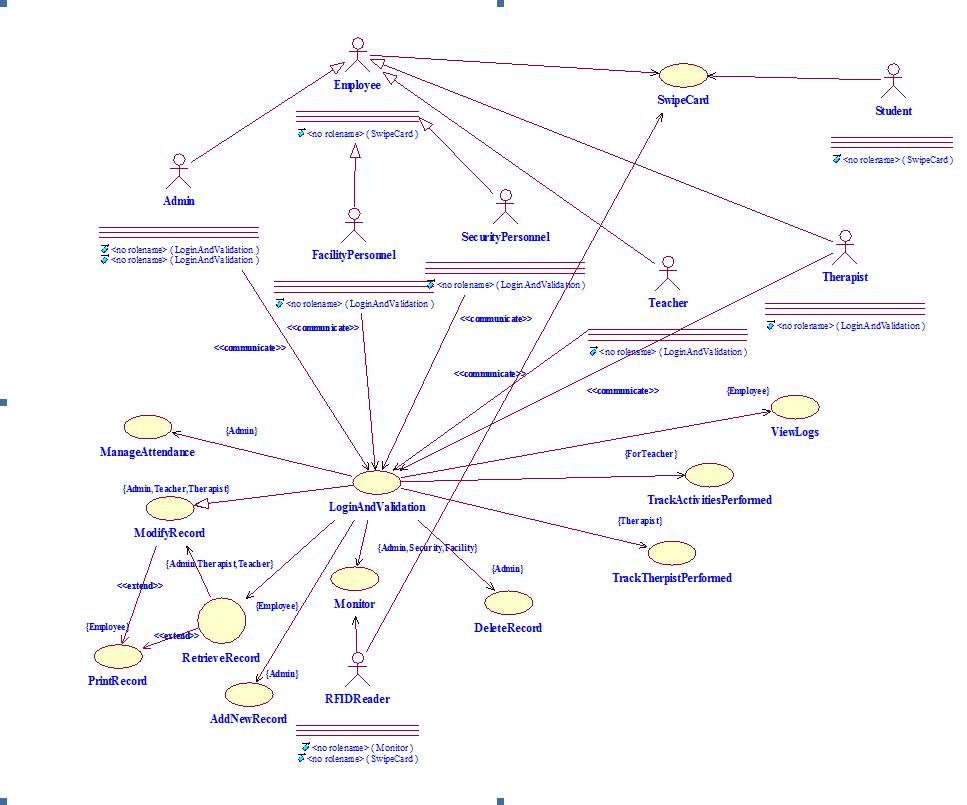
Figure 3.1 Use Case model
3.6 Class and Capsule
Classes:
The various classes used to build a badge tracking system are:
n Person : This is a class which will hold general behaviour and attributes of a person like name, address, age, date of birth and getname(), setname(), getaddress(), setaddress(), getage(), setage() etc. This will act as the base class.
n Employee: This is the class which will inherit from Person class and will contain the reference of department lass and will hold attributes like employee id,epc code,phone number,email id,department id and operations like getemployeeid(), getepccode(), getemployeeidFromEpcCode(), getdepartmentid() etc.
n Student: This is the class which will inherit from the person class and will contain attributes like student id,epc code, phone number, email id, handicappedType and operations like getstudentid(), getepccode(), getstudentidFromEpcCode() etc.
n Admin: This class will inherit from employee class and will be used for admin personnel of the school.
n Therapist: This class will inherit from employee class and will be used for therapist personnel of the school.
n FacilityPersonnel: This class will inherit from employee class and will be used for facility personnel of the school.
n SecurityPersonnel: This class will inherit from employee class and will be used for security personnel of the school.
n Teacher: This class will inherit from employee class and will be used for Teachers personnel of the school.
n Hardware: This class will hold any hardware that will be used by the application. It will have attributes like serialnumber, modelnumber, hardwarename, hardwaretype and operations like getSerialNumber(), getModelNumber(), getHardwareName(), getHwType(), etc.
n RFIDReader: This class will be used to hold the RFID readers details and will extend the Hardware class. This will be used by the RFID readers to hold attributes like installationDate, locationofInstallation and operations like getEpccode(), formatEPCCode(), readdata(), senddataToDatabase() etc.
n Sensors: This class will extend Hardware class and will be used to monitor accidents. This will also have the reference to alarm class. This will contain attributes like installationdate, locationofinstallation, monitoringelement, monitoringparameter and operations like getinstallationdate(),getLocation(),raiseAlarm().
Capsules:
The various capsules used to build a badge tracking system are:
n AYSApp: This is the main initial capsule and it authenticates and validates the client according to the employee type and displays the application menu that they are authorised to use. There are 5 timing ports and basing on their employee type and authentication the ports will open their respective modules.
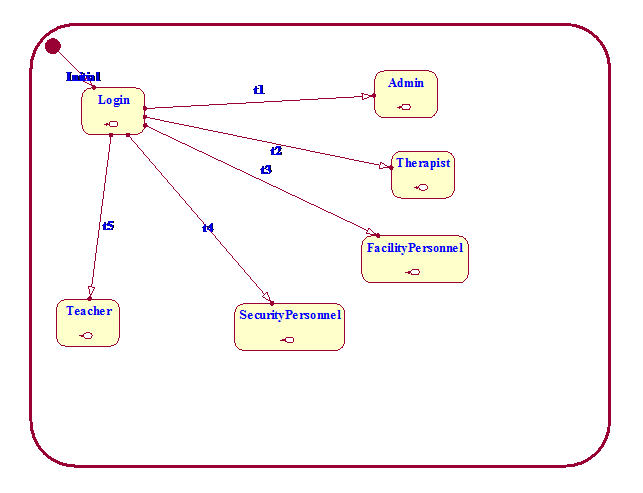
Figure 3.2 State Diagram of AYSApp Capsule
n DatabaseOperation: This class will be used by the employees to add/modify/retrieve/delete record operations that they are authorised to use. To get into this capsule the modules need to use p2.signal1 signal of DatabaseOps protocol. The signal1 takes int data, so if the signal comes with 1 data then the employee is Admin, if it comes with 2 then the employee is Therapist, if the employee signal1 comes with 3 then the employee is Facility Personnel, if it comes with 4 then the employee is Security Personnel and if it comes with 5 then the employee is Teacher. So basing on the data (int) being sent with the signal the capsule displays the respective database operations that the employee is authorised to use.
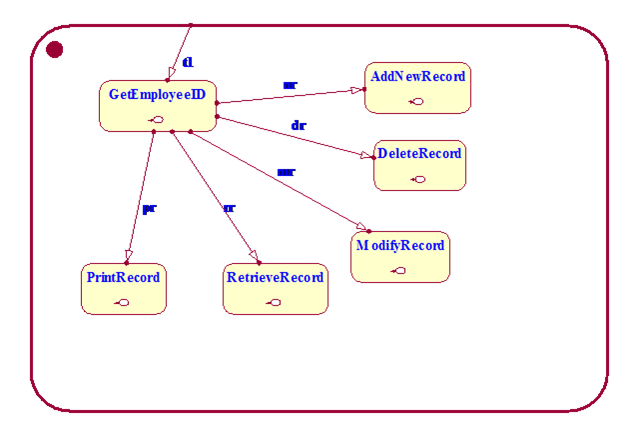
Figure 3.3 State Diagram of the DatabaseOperation capsule
n ManageAttendanceCapsule: This capsule will be used by the admin team to see the attendance record. To come to this capsule matt2.as1 signal of ManageAttendance protocol needs to be sent from Admin module.
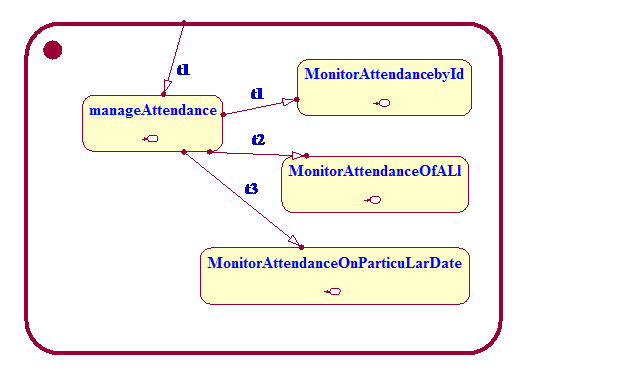
Figure 3.4 State diagram of the ManageAttendance capsule
n MonitorCaps: This capsule will be used by the security and facility personnel to track the movement students/employees inside the school premises. To use this capsule m2.msignal signal of MonitorOps protocol needs to be sent. The msignal can carry int data while passing between ports. If it carries 1 then the employee is Facility personnel and so we do not authorise him to raise an alarm. If it carries 2 then the employee is security personnel and so this capsule will allow him to raise alarm if needed.
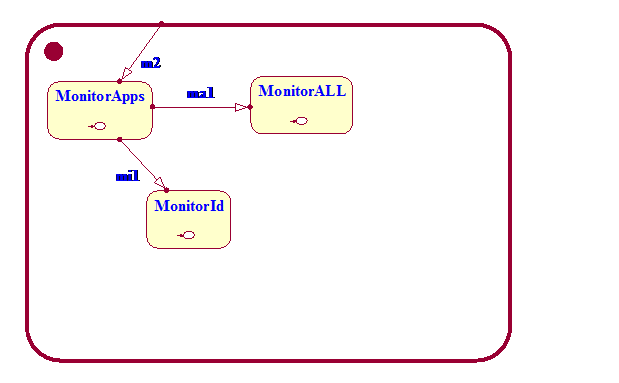
Figure 3.5 State diagram of the MonitorOps capsule
TrackTherapyCaps: This capsule will be used by the Teachers and Therapist to check the activities done by the student and the therapies given to the student and the therapy duration. To use this module the employee needs to send th2.ttsignal of TrackTherapyProt protocol. The ttsignal takes int as an integer and if the signal contains 1 as data then the capsule the menu for therapist and if the signal data is 2 then the capsule shows the menu for Teacher.
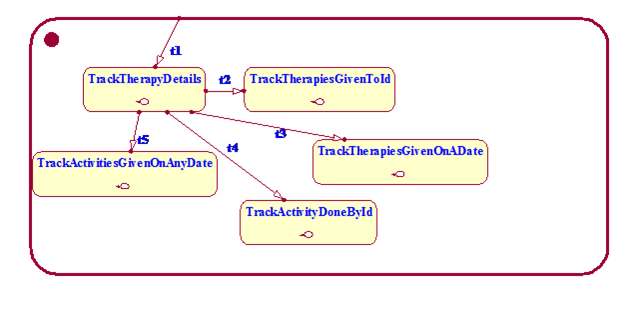
Figure 3.6 State diagram of the TrackTherapyCaps capsule
ViewLogs: This capsule will be used by all the employee to see the logs with time stamps that contains the user who logs in the application and it also contains all the data’s regarding what all operations the user has performed during his/her session of the AYS application. To use this capsule a vls signal of ViewLogs protocol needs to be sent.
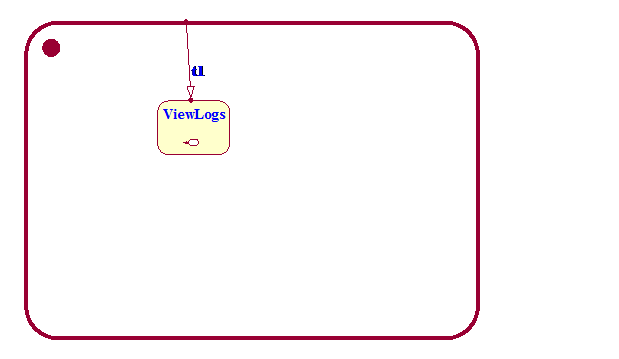
Figure 3.7 State Diagram of the ViewLogs capsule
n Top: this capsule will contain all the capsule and it will also contain how all the capsules are connected through the ports. This capsule will be used by the Component view to build a component.
3.7 Structure Diagram
The AYSApp shall use:
n DatabaseOps protocol and ports p1 and p2 to communicate with the DatabaseOperation capsule.
n ManageAttendance protocol and ports matt1 and matt2 to communicate with the ManageAttendance capsule.
n ViewLogs protocol and ports vl1 and vl2 to communicate with the ViewLogs capsule.
n TrackTherapyProt protocol and ports th1 and th2 to communicate with the TrackTherapy capsule.
n MonitorOps protocol and ports m1 and m2 to communicate with the MonitorCaps capsule.
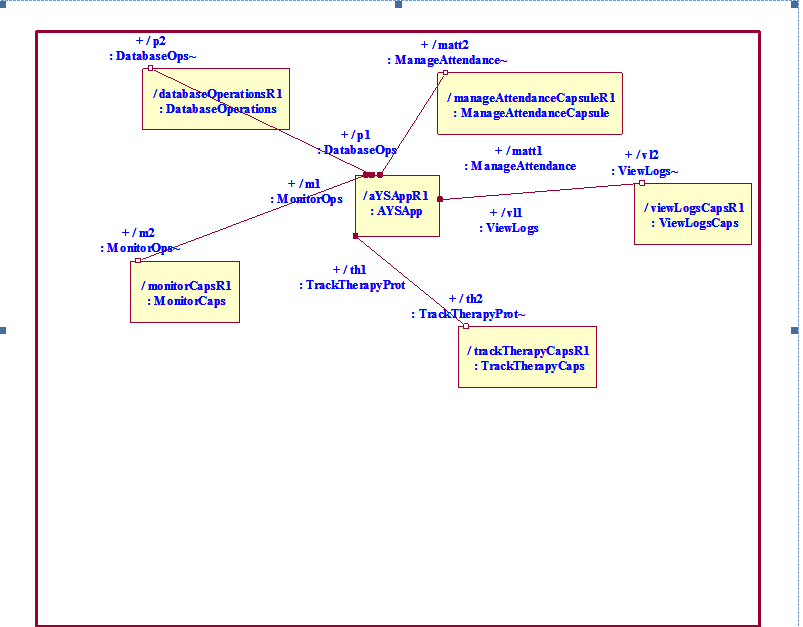
Figure 3.8 Structure Diagram
3.8 Sequence Diagram
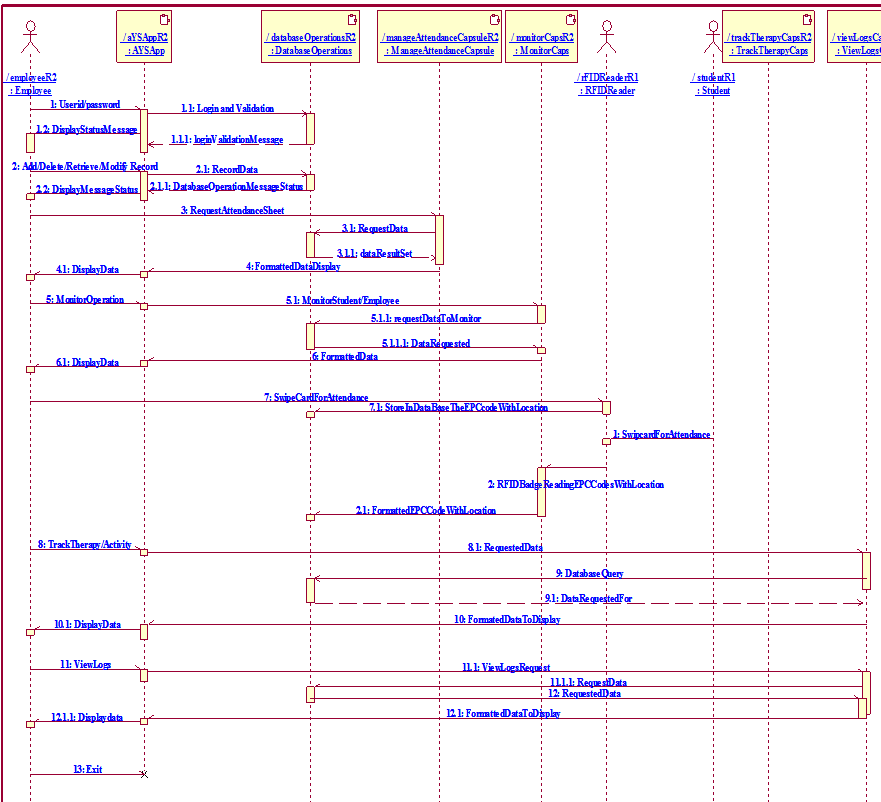
Figure 3.9 Sequence Diagram
3.9 Class Diagram
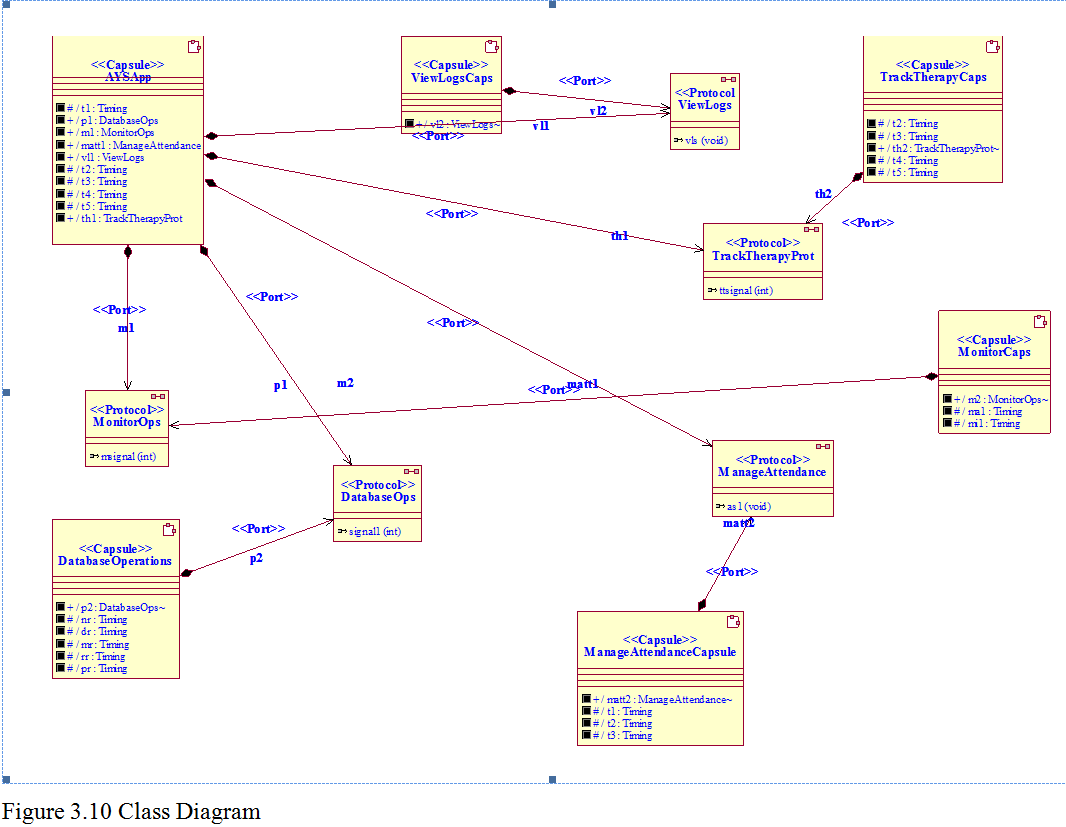
The AYSApp shall use:
n DatabaseOps protocol and ports p1 and p2 to communicate with the DatabaseOperation capsule.
n ManageAttendance protocol and ports matt1 and matt2 to communicate with the ManageAttendance capsule.
n ViewLogs protocol and ports vl1 and vl2 to communicate with the ViewLogs capsule.
n TrackTherapyProt protocol and ports th1 and th2 to communicate with the TrackTherapy capsule.
n MonitorOps protocol and ports m1 and m2 to communicate with the MonitorCaps capsule.
3.11 Result
We have seen the Structured Analysis and Object Oriented Analysis while building a small badge tracking application for handicapped students. We tried to use RFID tags and RFID reader for tracking and attendance of employees. We have gathered both functional and non functional requirements. We have used Rational Rose Real Time to build Object Oriented models.
3.12 Comparative Analysis
Structured Analysis process is usually defined quite informally. The Object-Oriented (OO) paradigm provided a powerful and effective environment for analyzing, designing, and implementing flexible and robust real-world systems, offering benefits such as encapsulation (information hiding), polymorphism, inheritance, and reusability. The OO analysis is focussed on objects while the Structured Analysis is focussed on processes. One of the main benefits of the OO approach is that it provides a continuum of representation from analysis to design to implementation, thus engendering a seamless transition from one model to another.
In this work we have chosen the Rational Rose Real Time as a CASE tool. In Structured Analysis we have used DFD, CFD, CSPEC and PSPEC and from this we came to know how the data flows and how the control flows. But in OO analysis we have used UML as a language and the entire application were divided into modules and so it gave us a more precise and clear scenario of the application. In OO analysis we have used Class Diagram, Use case diagram, Sequence diagram, state diagrams, component view, and deployment view. One of the main benefits of the OO approach is that it provided a continuum of representation from analysis to design to deployment, thus engendering a seamless transition from one model to another.
Appendix
- A. AYSAPP Capsule – State Login Entry Action Code
cout<<“^^^^^^^^^^^^^^^^^^^^^^^^^^^^^^^^^^^^^^^”<<endl;
cout<<“^^^^^^^^^^^^^WELCOME to AYS^^^^^^^^^^^^”<<endl;
cout<<“^^^^^^^^^^^^^^^^^^^^^^^^^^^^^^^^^^^^^^^”<<endl;
int userid,pin,choice;
choice = 1;
while(choice )
{
cout<< “Enter employee id”<<endl;
cout<< “1 = Admin”<<endl;
cout<< “2 = Therapist”<<endl;
cout<< “3 = Facility Personnel”<<endl;
cout<< “4 = Security Personnel”<<endl;
cout<< “5 = Teacher”<<endl;
cin>>userid;
if(userid == 1 || userid == 2 ||userid == 3 ||userid == 4 ||userid == 5 )
{
cout<< “Enter pin”<<endl;
cin>>pin;
if(pin == 123)
{
cout<< “Login successfull”<<endl;
if(userid == 1)
{
cout<< “Employee Type is Admin”<<endl;
choice = 0;
t1.informIn(RTTimespec(2,0));
break;
}
else if(userid == 2)
{
cout<< “Employee Type is Therapist”<<endl;
t2.informIn(RTTimespec(2,0));
choice = 0;
}
else if(userid == 3)
{
cout<< “Employee Type is Facility Personnel”<<endl;
t3.informIn(RTTimespec(2,0));
choice = 0;
}
else if(userid == 4)
{
cout<< “Employee Type is Security Personnel”<<endl;
t4.informIn(RTTimespec(2,0));
choice = 0;
}
else if(userid == 5)
{
cout<< “Employee Type is Teacher”<<endl;
t5.informIn(RTTimespec(2,0));
choice = 0;
}
}else
{
cout<< “Invalid pin”<<endl;
cout<< “Want to try login again , enter 1. to continue and 0 to quit”<<endl;
cin>>choice;
}
}else
{
cout<< “Invalid user id choice”<<endl;
cout<< “Want to try again , enter 1. to continue and 0 to quit”<<endl;
cin>>choice;
}
}
B. AYSAPP Capsule – State Admin Entry Action Code
int no,choice;
choice = 1;
while(choice)
{
cout<<” select the operation”<<endl;
cout<<” 1. Add/Retrieve/Modify/Delete record”<<endl;
cout<<” 2. Monitor Student/Employee”<<endl;
cout<<” 3. Manage Attendance”<<endl;
cout<<” 4. View Logs”<<endl;
cin>>no;
switch(no)
{
case 1:cout<<” Add/Retrieve/Modify/Delete Record is selected………..”<<endl;
choice = 0;
p1.signal1(no).send();
break;
case 2:cout<<” Monitor student/Employee is selected…………..”<<endl;
choice = 0;
m1.msignal(1).send();
break;
case 3:cout<<” Manage Attendance is selected……………..”<<endl;
choice = 0;
matt1.as1().send();
break;
case 4:cout<<” View Logs is selected………………”<<endl;
choice = 0;
vl1.vls().send();
break;
default:cout<<” invalid entry”<<endl;
cout<<” Want to try again, enter 1 to continuue and 0 to quit”<<endl;
cin>>choice;
break;
}
}
C. AYSAPP Capsule – State Therapist Entry Action Code
int choice;
cout<<“Inside Therapist Module”<<endl;
cout<<“Enter :”<<endl;
cout<<” 1. Modify/retrieve/print any student details”<<endl;
cout<<” 2. Track Students therapy details”<<endl;
cout<<” 3. View logs”<<endl;
cin>>choice;
int number=2;
switch(choice)
{
case 1:
cout<<” Modify/retrieve any student details option is selected”<<endl;
p1.signal1(number).send();
break;
case 2:
cout<<“Track Students therapy details option is selected”<<endl;
th1.ttsignal(1).send();
break;
case 3:
cout<<“View Logs is seleceted”<<endl;
vl1.vls().send();
break;
default:
cout<<“wrong choice”<<endl;
break; }
D. AYSAPP Capsule – State FacilityPersonnel Entry Action Code
int choice;
int num = 3;
cout<<“Inside Facility Personnel Module”<<endl;
cout<<“Enter 1 Retrieve /Print Record”<<endl;
cout<<“Enter 2 Monitor Operation”<<endl;
cout<<“Enter 3 View Logs”<<endl;
cin>>choice;
switch(choice)
{
case 1:
cout<<“Retrieve /Print Record option selected”<<endl;
p1.signal1(num).send();
break;
case 2:
cout<<“Monitor Operation is selected”<<endl;
m1.msignal(num).send();
break;
case 3:
cout<<“View Logs is selected”<<endl;
vl1.vls().send();
break;
default:
cout<<“Invalid Entry”<<endl;
break;
}
E. AYSAPP Capsule – State SecurityPersonnel Entry Action Code
int choice;
int num = 4;
cout<<“Inside Security Personnel Module”<<endl;
cout<<“Enter 1 Retrieve /Print Record”<<endl;
cout<<“Enter 2 Monitor Operation”<<endl;
cout<<“Enter 3 View Logs”<<endl;
cin>>choice;
switch(choice)
{
case 1:
cout<<“Retrieve /Print Record option selected”<<endl;
p1.signal1(num).send();
break;
case 2:
cout<<“Monitor Operation is selected”<<endl;
m1.msignal(num).send();
break;
case 3:
cout<<“View Logs is selected”<<endl;
vl1.vls().send();
break;
default:
cout<<“Invalid Entry”<<endl;
break;
}
F. AYSAPP Capsule – State Teacher Entry Action Code
int choice;
cout<<“Inside Teachers Module”<<endl;
cout<<“Enter :”<<endl;
cout<<” 1. Modify/retrieve/print any student details”<<endl;
cout<<” 2. Track Students activity details”<<endl;
cout<<” 3. View Logs”<<endl;
cin>>choice;
int number=5;
switch(choice)
{
case 1:
cout<<” Modify/retrieve any student details option is selected”<<endl;
p1.signal1(number).send();
break;
case 2:
cout<<“Track Students activity details option is selected”<<endl;
th1.ttsignal(2).send();
break;
case 3:
cout<<“View logs is selected”<<endl;
vl1.vls().send();
break;
default:
cout<<“wrong choice”<<endl;
break;
}
G. DatabaseOperations capsule – State GetEmployeeId Entry Action Code
int choice = *(int*)getMsg()->getData();
int dbops;
if(choice == 1)
{
cout<<“Admin opted for DB ops so enter”<<endl;
cout<<” 1 Add New Record”<<endl;
cout<<” 2 Delete record”<<endl;
cout<<” 3 Modify record”<<endl;
cout<<” 4 Retrieve record”<<endl;
cout<<” 5 Print record”<<endl;
cin>>dbops;
switch(dbops)
{
case 1:
cout<<“Add new record selected”<<endl;
nr.informIn(RTTimespec(2,0));
break;
case 2:
cout<<“Delete Record selected”<<endl;
dr.informIn(RTTimespec(2,0));
break;
case 3:
cout<<“Modify record selected”<<endl;
mr.informIn(RTTimespec(2,0));
break;
case 4:
cout<<“Retrieve record selected”<<endl;
rr.informIn(RTTimespec(2,0));
break;
case 5:
cout<<“Print Record selected”<<endl;
pr.informIn(RTTimespec(2,0));
break;
default:
cout<<“Invalid entry”<<endl;
break;
}
}
else if(choice == 2 || choice ==5)
{
if(choice == 2)
cout<<“Therapist opted for DB ops so enter”<<endl;
else if(choice ==5)
cout<<“Teacher opted for DB ops so enter”<<endl;
cout<<” 1 Modify record”<<endl;
cout<<” 2 Retrieve record”<<endl;
cout<<” 3 Print record”<<endl;
cin>>dbops;
switch(dbops)
{
case 1:
cout<<“Modify record selected”<<endl;
mr.informIn(RTTimespec(2,0));
break;
case 2:
cout<<“Retrieve record selected”<<endl;
rr.informIn(RTTimespec(2,0));
break;
case 3:
cout<<“Print Record selected”<<endl;
pr.informIn(RTTimespec(2,0));
break;
default:
cout<<“Invalid entry”<<endl;
break;
}
}
else if(choice == 3 || choice == 4)
{
if(choice == 3)
cout<<“Facility Personnel opted for DB ops so enter”<<endl;
else if(choice == 4)
cout<<“Security Personnel opted for DB ops so enter”<<endl;
cout<<” 1 Retrieve record”<<endl;
cout<<” 2 Print record”<<endl;
cin>>dbops;
switch(dbops)
{
case 1:
cout<<“Retrieve record selected”<<endl;
rr.informIn(RTTimespec(2,0));
break;
case 2:
cout<<“Print Record selected”<<endl;
pr.informIn(RTTimespec(2,0));
break;
default:
cout<<“Invalid entry”<<endl;
break;
}
}
H. DatabaseOperations capsule – State AddNewRecord Entry Action Code
cout<<“Enter student/employee details”<<endl;
cout<<“@@@@@@@@@@@@@@@@@@@@@@@@@@@@@”<<endl;
cout<<“record saved to the data base”<<endl;
I. DatabaseOperations Capsule – State DeleteRecord Entry Action Code
cout<<” Enter Employee Id / Student Id to delete”<<endl;
cout<<“Record deleted from the database”<<endl;
J. DatabaseOperations Capsule – State ModifyRecord Entry Action Code
cout<<” Enter Employee Id / Student Id to modify”<<endl;
cout<<“@@@@@@@@@@@@@@@@@@@@@@@@@@@@@”<<endl;
cout<<“Record modified from the database”<<endl;
K. DatabaseOperations Capsule – State RetrieveRecord Entry Action Code
cout<<” Enter Employee Id / Student Id to retrieve details”<<endl;
cout<<“@@@@@@@@@@@@@@@@@@@@@@@@@@@@@”<<endl;
cout<<“Please see the details”<<endl;
cout<<“@@@@@@@@@@@@@@@@@@@@@@@@@@@@@@”<<endl;
L. DatabaseOperations Capsule – State PrintRecord Entry Action Code
cout<<” Enter Employee Id / Student Id to print record”<<endl;
cout<<“@@@@@@@@@@@@@@@@@@@@@@@@@@@@@”<<endl;
cout<<“Select the Printer”<<endl;
cout<<“Please collect the printout”<<endl;
M. ManageAttendance Capsule – State manageAttendance Entry Action Code
cout<< ” Welcome to the Students/Employees Attendance Sheet”<<endl;
int choice;
cout<<” Enter :”<<endl;
cout<<” 1 Monitor attendance of all “<<endl;
cout<<” 2 Monitor attendance of a particular id for current date”<<endl;
cout<<” 3 Monitor attendance of a particular calendar date “<<endl;
cin>>choice;
switch(choice)
{
case 1:
cout<<“Monitor attendance for all entered”<<endl;
t1.informIn(RTTimespec(2,0));
break;
case 2:
cout<<“Monitor attendance of a particular id for current date is selected”<<endl;
t2.informIn(RTTimespec(2,0));
break;
case 3:
cout<<“Monitor attendance of a particular calendar date is selected “<<endl;
t3.informIn(RTTimespec(2,0));
break;
}
N. ManageAttendance Capsule – State MonitorAttendanceById Entry Action Code
int id;
cout<<“Enter the id to manage its attendance”;
cin>>id;
cout<<“Attendance sheet of the id “<<id<<“is”<<endl;
cout<<“Date/day:absent”<<endl;
cout<<“Date/day:absent”<<endl;
cout<<“Date/day:absent”<<endl;
cout<<“Date/day:present”<<endl;
cout<<“Date/day:present”<<endl;
cout<<“Date/day:present”<<endl;
cout<<“Date/day:present”<<endl;
cout<<“……………………………”<<endl;
cout<<“Date/day:present”<<endl;
cout<<“Date/day:present”<<endl;
O. ManageAttendance Capsule – State ManageAttendanceOfAll Entry Action Code
cout<<“Todays attendance sheet is”<<endl;
cout<<“empid is present”<<endl;
cout<<“empid is present”<<endl;
cout<<“empid is present”<<endl;
cout<<“empid is present”<<endl;
cout<<“empid is absent”<<endl;
cout<<“studentid is absent”<<endl;
cout<<“studentid is present”<<endl;
cout<<“studentid is absent”<<endl;
cout<<“studentid is present”<<endl;
cout<<“studentid is absent”<<endl;
cout<<“studentid is present”<<endl;
cout<<“……………………………”<<endl;
cout<<“studentid is present”<<endl;
cout<<“studentid is absent”<<endl;
cout<<“studentid is present”<<endl;
cout<<“studentid is absent”<<endl;
cout<<“studentid is present”<<endl;
P. ManageAttendance Capsule – State ManageAttendanceOnParticularDate Entry Action Code
cout<<“Select the date to manage the attandance”<<endl;
cout<<“Show the calendar to select the date”<<endl;
cout<<“empid is present”<<endl;
cout<<“empid is present”<<endl;
cout<<“empid is present”<<endl;
cout<<“empid is present”<<endl;
cout<<“empid is absent”<<endl;
cout<<“studentid is absent”<<endl;
cout<<“studentid is present”<<endl;
cout<<“studentid is absent”<<endl;
cout<<“studentid is present”<<endl;
cout<<“studentid is absent”<<endl;
cout<<“studentid is present”<<endl;
cout<<“……………………………”<<endl;
cout<<“studentid is present”<<endl;
cout<<“studentid is absent”<<endl;
cout<<“studentid is present”<<endl;
cout<<“studentid is absent”<<endl;
cout<<“studentid is present”<<endl;
Q. MonitorCaps Capsule – State MonitorApps Entry Action Code
int paramChoice = *(int*)getMsg()->getData();
int choice;
if(paramChoice == 1 || paramChoice ==3)
{
cout<<“Enter 1 to monitor all employees and student in tabular format”<<endl;
cout<<“Enter 2 to monitor a particular list of student/employee”<<endl;
}
else if( paramChoice == 4)
{
cout<<“Enter 1 to monitor all employees and student in tabular format”<<endl;
cout<<“Enter 2 to monitor a particular list of student/employee”<<endl;
cout<<“Enter 3 to Raise Alarm”<<endl;
}
cin>>choice;
switch(choice)
{
case 1:
cout<<“Monitoring Student/Employees”<<endl;
ma1.informIn(RTTimespec(2,0));
break;
case 2:
cout<<“Monitoring Particular Id will start”<<endl;
mi1.informIn(RTTimespec(2,0));
break;
case 3:
cout<<“Alarm signalled”<<endl;
break;
default:
cout<<“Wrong Choice”<<endl;
}
R. MonitorCaps Capsule – State MonitorAll Entry Action Code
cout<<“retrieving all id’s locations from rfid readers installed and rfid reader database”<<endl;
cout<<“Location id XXXX “<<“EPC code 1″<<” EPC Code 2 “<<endl;
cout<<“Location id YYYY “<<“EPC code 3″<<” EPC Code 4 “<<endl;
cout<<“Location id ZZZZ “<<“EPC code 5″<<” EPC Code 6 “<<endl;
cout<<“Location id AAAA “<<“EPC code 7″<<” EPC Code 8 “<<endl;
cout<<“Location id BBBB “<<“EPC code 9″<<” EPC Code 10 “<<endl;
S. MonitorCaps Capsule – State MonitorId Entry Action Code
cout<<“Enter employee id/student id to monitor”<<endl;
cout<<“Retrieving details from the RFID reader database”<<endl;
cout<<“EmployeeId / Student ID are in location ID XXXXX”<<endl;
T. TrackTherapyCaps Capsule – State TrackTherapyDetails Entry Action Code
int TherapyOrActivitychoice = *(int*)getMsg()->getData();
int choice;
if(TherapyOrActivitychoice ==1)
{
cout<<” Enter 1. Track therapy given to a particular student id/name”<<endl;
cout<<“Enter 2.Track therapies given to students on a particular calendar day”<<endl;
cin>>choice;
switch(choice)
{
case 1:
cout<<” Tracking therapy given to a particular student id/name option is selected”<<endl;
t2.informIn(RTTimespec(2,0));
break;
case 2:
cout<<“Track therapies given to students on a particular calendar day option is selected”<<endl;
t3.informIn(RTTimespec(2,0));
break;
default:
cout<<“wrong choice”<<endl;
break;
}
}
else if (TherapyOrActivitychoice ==2)
{
cout<<” Enter 1. Track activity given to a particular student id/name”<<endl;
cout<<“Enter 2.Track activities given to students on a particular calendar day”<<endl;
cin>>choice;
switch(choice)
{
case 1:
cout<<” Tracking activity given to a particular student id/name option is selected”<<endl;
t4.informIn(RTTimespec(2,0));
break;
case 2:
cout<<“Track activities given to students on a particular calendar day option is selected”<<endl;
t5.informIn(RTTimespec(2,0));
break;
default:
cout<<“wrong choice”<<endl;
break;
}
}
U. TrackTherapyCaps Capsule – State TrackTherapiesGivenToId Entry Action Code
int id;
cout<<“Enter student id”<<endl;
cin>>id;
cout<<“student with id “<<id<<” has the therapy details as follows “<<endl;
cout<<“dd/mm/yyy therapy id duration “<<endl;
cout<<“08/09/2012 123 3″<<endl;
cout<<“07/09/2012 133 3″<<endl;
cout<<“06/09/2012 143 7″<<endl;
cout<<“…………………………………………………”<<endl;
V. TrackTherapyCaps Capsule – State TrackTherapiesGivenOnADate Entry Action Code
cout<<“Show the calendar”<<endl;
cout<<“Select the date”<<endl;
cout<<“date student id therapylist(thid_duration)”<<endl;
cout<<“08/09/2012 1234 th1_3,th2_4″<<endl;
cout<<“08/09/2012 1233 th1_3,th2_4″<<endl;
cout<<“08/09/2012 1232 th1_3,th2_4″<<endl;
cout<<“07/09/2012 1234 th5_3,th4_4″<<endl;
cout<<“07/09/2012 1233 th5_3,th4_4″<<endl;
cout<<“………………………………………………………………………………..”<<endl;
W. TrackTherapyCaps Capsule – State TrackActivitiesDoneById Entry Action Code
int id;
cout<<“Enter student id”<<endl;
cin>>id;
cout<<“student with id “<<id<<” has the activity details as follows “<<endl;
cout<<“dd/mm/yyy activity id duration “<<endl;
cout<<“08/09/2012 A123 3″<<endl;
cout<<“07/09/2012 A133 3″<<endl;
cout<<“06/09/2012 A143 7″<<endl;
cout<<“…………………………………………………”<<endl;
X. TrackTherapyCaps Capsule – State TrackActivitiesGivenOnAnyDate Entry Action Code
cout<<“Show the calendar”<<endl;
cout<<“Select the date”<<endl;
cout<<“date student id ActivityList(Aid_duration)”<<endl;
cout<<“08/09/2012 1234 A1_3,A2_4″<<endl;
cout<<“08/09/2012 1233 A1_3,A2_4″<<endl;
cout<<“08/09/2012 1232 A1_3,A2_4″<<endl;
cout<<“07/09/2012 1234 A5_3,A4_4″<<endl;
cout<<“07/09/2012 1233 A5_3,A4_4″<<endl;
cout<<“………………………………………………………………………………..”<<endl;
Y. ViewLogsCaps Capsule – State ViewLogs Entry Action Code
cout<<” Inside Log View “<<endl;
cout<<” Date_Timestamp aaaaaaaaaaaaaaa…….. “<<endl;
cout<<” Date_Timestamp aaaaaaaaaaaaaaa…….. “<<endl;
cout<<” Date_Timestamp aaaaaaaaaaaaaaa…….. “<<endl;
cout<<” Date_Timestamp aaaaaaaaaaaaaaa…….. “<<endl;
cout<<” Date_Timestamp aaaaaaaaaaaaaaa…….. “<<endl;
cout<<” Date_Timestamp aaaaaaaaaaaaaaa…….. “<<endl;
cout<<“………………………………………………………………….”<<endl;
cout<<” Date_Timestamp aaaaaaaaaaaaaaa…….. “<<endl;
cout<<” Date_Timestamp aaaaaaaaaaaaaaa…….. “<<endl;
cout<<” Date_Timestamp aaaaaaaaaaaaaaa…….. “<<endl;
cout<<” Date_Timestamp aaaaaaaaaaaaaaa…….. “<<endl;
cout<<” Date_Timestamp aaaaaaaaaaaaaaa…….. “<<endl;
cout<<” Date_Timestamp aaaaaaaaaaaaaaa…….. “<<endl;
 TheIntRendz