
Home » Tech Talk (Page 13)
Category Archives: Tech Talk
Character Device Driver in Linux
2.1 Introduction
Device drivers are distinct “black boxes” [4] that make a particular piece of hardware respond to a well-defined internal programming interface; they hide completely the details of how the device works. User activities are performed by means of a set of standardized calls that are independent of the specific driver; mapping those calls to device-specific operations that act on real hardware is then the role of the device driver. The devices in UNIX fall in two categories- Character devices and Block devices. Character devices can be compared to normal files in that we can read/write arbitrary bytes at a time (although for most part, seeking is not supported).They work with a stream of bytes. Block devices, on the other hand, operate on blocks of data, not arbitrary bytes. Usual block size is 512 bytes or larger powers of two. However, block devices can be accessed the same was as character devices; the driver does the block management. (Networking devices do not belong to these categories, the interface provided by these drivers in entirely different from that of char/block devices).The beauty of UNIX is that devices are represented as files. Both character devices and block devices are represented by respective files in the /dev directory. This means that you can read and write into the device by manipulating those file using standard system calls like open, read, write, close, etc. This part covers the design and implementation of two FIFO’s (device files) each for virtual character devices One FIFO, which is used for writing, is a write only device node and other one, which is used for reading, is a read only device node under /dev directory. The write only device shall be written and when the read only device file is read it shall display the things that are being written in the write only device file.
2.1 Design
2.2.1 Device Driver
The first task is to decide what the device driver’s internal data structures will look like. What is required is that the device driver should be capable of storing a number of short text messages which are in transit between two processes. The number of messages the driver is required to hold is supposed to be infinite (infinite on a computer usually means ‘until you run out’) but in practice it would probably only hold a few messages until they could be read. Here the size of 1024 bytes is chosen i.e. a maximum of 1024 bytes of data can be written/read to and from the device respectively. This means that you really want to use a variable number of dynamically allocated buffers which can be built up into a FIFO queue which is best implemented as a linked list. For this dynamic allocation and release of blocks of memory is required. The standard library malloc () and free () functions cannot be used because the standard library is not available from within the kernel. However, there is a kernel equivalent to malloc () which can be used instead. The structure from which the linked list of messages will be built has the following layout.
struct cva_buf
{
int buf_size;
char buffer [BUF_LEN];
struct cva_buf *link;
};
where buffer[] is the array that holds one of the short messages, buf_size says how many characters in the buffer[] array are in use, and link is the linked list pointer to the next cva_buf. The symbolic constant BUF_LEN can be set to whatever matches the idea of the maximum length of a ‘short’ message, but here 1024 was chosen which means 1024 characters. The prefix used in the tiny device driver to make its identifiers unique will be cva_xxxx, where xxxx will be different operations. Bearing this in mind the header was created. To see the complete header file please refer Appendix A. The driver was built for Linux kernel 2.6.35-32-generic. The first section includes all the relevant header files.
#include <linux/kernel.h>
#include <linux/sched.h>
#include <linux/tty.h>
#include <linux/signal.h>
#include <linux/ermo.h>
#include <linux/malloc.h>
#include <asm/io.h>
#include <asm/segment.h>
#include <asm/system.h>
#include <asm/irq.h>
Then the variables and constants used within the driver were defined. The maximum length of the message for the device BUF_LEN was fixed to 1024, the DEVICE_NAME macro was made to hold the string “cva”, MAJOR_NUM was defined to be 100, CVA_WRITE was made 0 and CVA_READ was made 1, and qhead and qtail are the head and tail pointers to the linked list of messages. Then the file_operations structure to point to the other device driver routines needs to be defined. A pointer to this structure should be passed into the kernel at boot time by the initialization routine.
ssize_t cva_write(struct file *file,const char *buffer,size_t length,loff_t *offset);
ssize_t cva_read(struct file *file,char *buffer,size_t length,loff_t *offset);
int cva_open(struct inode *inode, struct file *file);
int cva_release(struct inode *, struct file *);
int cva_flush(struct file *);
struct file_operations cva_fops = {
owner: THIS_MODULE,
write: cva_write,
read: cva_read,
open: cva_open,
release: cva_release,
flush: cva_flush, };
Moving into the driver code , the first thing to look at is the initialization function init_module().When this function is executed it calls the kernel function register_chrdev() to add its file_operations structure to the character device routine address table.
int init_module()
{
int ret_val;
/* Register the character device (atleast try) */
ret_val = register_chrdev(MAJOR_NUM,
DEVICE_NAME,
&cva_fops);
/* Negative values signify an error */
if (ret_val < 0) {
printk (“%s failed with %d\n”,
“Sorry, registering the character device “,
ret_val);
return ret_val;
}
write_busy = 0;
read_busy = 0;
printk (“%s The major device number is %d.\n”,
“Registeration is a success”,
MAJOR_NUM);
printk (“If you want to talk to the device driver,\n”);
printk (“you’ll have to create a device file. \n”);
printk (“We suggest you use:\n”);
printk (“mknod %s c %d 0\n”, DEVICE_NAME,
MAJOR_NUM);
//printk (“The device file name is important, because\n”);
//printk (“the ioctl program assumes that’s the\n”);
//printk (“file you’ll use.\n”);
return 0;
}
To unregister the device from the proc at the time of clean up is handled in cleanup_module () which uses unregister_chrdev () method which takes major number and the device name to unregister,
void cleanup_module()
{
/* Unregister the device */
printk( “<1>Removing \’%s\’ module\n”, DEVICE_NAME );
unregister_chrdev(MAJOR_NUM, DEVICE_NAME);}
c structure pointed to by the inode parameter. If the device special file is CVA_WRITE (i.e. /dev/cva0) then the write_busy flag is checked to see if this device is already open. If it is then an EBUSY error is returned; otherwise the flag is set to 1 to busy the device against further open () calls and a zero value is returned, indicating no errors. Similarly, if this is an open () request for /dev/cva1 (using CVA_READ) then the read_busy flag is checked and, if necessary, set to ensure exclusive access to the device special file.
The release function, cva_release(),is called when the last process that is holding open each of the device special files associated with this device driver closes it with a close()call. In fact, since only one process at a time can open each of the device special files for this driver, then a close () from this process will also call the driver release routine (cva_release ())
int cva_release(struct inode *inode, struct file *file)
{
printk(“cva_release”);
switch ((int)iminor(inode))
{
case CVA_WRITE:
write_busy = 0;
break;
case CVA_READ:
read_busy = 0;
break;
}
return 0;
}
All that cva_release () does is to reset the appropriate read or write busy flag, and make it ready for the next open () operation to take place on the device special file. Similarly the cva_flush () is implemented to reset the appropriate read or write busy flag and make it ready for next open () whenever the device file closes or is flushed.
int cva_flush(struct file* filp)
{
printk(“cva_flush”);
switch ((int)iminor(filp->f_path.dentry->d_inode))
{
case CVA_WRITE:
write_busy = 0;
break;
case CVA_READ:
read_busy = 0;
break;
}
return 0;
}
2.2.2 Device numbering
A Linux driver is a Linux module which can be loaded and linked to the kernel at runtime. The driver operates in kernel space and becomes part of the kernel once loaded, the kernel being monolithic. It can then access the symbols exported by the kernel. When the device driver module is loaded, the driver first registers itself as a driver for a particular device specifying a particular Major number.
It uses the call register_chrdev function for registration in the cva_open(). The call takes the Major number, device name and an address of a structure of the type file_operations (discussed later) as argument. Here the major number is 100. The choice of major number is arbitrary but it has to be unique on the system.The syntax of register_chrdev is
int register_chrdev(unsigned int major,const char *name,struct file_operations *fops)
2.2.3 Read and Write operation
Since a device file for this problem is write only so a check shall be provided to see if the file that is opened is write only in ( cva_write() ). Similar check for read only file shall be provided in the read operation ( cva_read () ) . In write operation a buffer needs to be created to hold the characters entered by the user to write in a file and the same buffer is to be read when the user wants to read it. Data structure used for this buffer shall be a linked list. Both read and write perform a similar task, that is, copying data from and to application code. Their prototypes are pretty similar and it is as follows
ssize_t read(struct file *filp, char __user *buff,
size_t count, loff_t *offp);
ssize_t write(struct file *filp, const char __user *buff,
size_t count, loff_t *offp);
For both methods, filp is the file pointer and count is the size of the requested data
transfer. The buff argument points to the user buffer holding the data to be written or the empty buffer where the newly read data should be placed. Finally, offp is a pointer to a “long offset type” object that indicates the file position the user is accessing. The return value is a “signed size type”. Driver must be able to access the user-space buffer in order to get its job done. This access must always be performed by special, kernel-supplied functions, however, in order to be safe. Some of those functions are defined in <asm/uaccess.h> . The code for read and write in cva needs to copy a whole segment of data to or from the user address space. This capability is offered by the following kernel functions, which copy an arbitrary array of bytes and sit at the heart of most read and write implementations:
unsigned long copy_to_user(void __user *to,
const void *from,
unsigned long count);
unsigned long copy_from_user(void *to,
const void __user *from,
unsigned long count);
The role of the two functions is not limited to copying data to and from user-space, they also check whether the user space pointer is valid. If the pointer is invalid, no copy is performed; if an invalid address is encountered during the copy, on the other hand, only part of the data is copied. In both cases, the return value is the amount of memory still to be copied. But here the optimized API is to be used. And this is put_user () and get_user () . These macros write the datum to user space; they are
relatively fast. put_user checks to ensure that the process is able to write to the given memory address. It returns 0 on success, and -EFAULT on error. get_user () is used to retrieve a single datum from user space. Both the read and write methods return a negative value if an error occurs. If some data is transferred correctly and then an error happens, the return value must be the count of bytes successfully transferred, and the error does not get reported until the next time the function is called. In read operation the linked list is read to see if there is any data to read so check the linked list by seeing if the head of the linked list is not 0. Then read the linked list’s buffer till the length mentioned by the read function or the linked list buffer size whichever is smaller. In write operation allocate the buffer to hold the data using kmalloc () and read from the user space and store it in the linked list buffer and update the buffer size of the message in the linked list. For implementation please refer section 2.3.3
2.1 Implementation
2.3.1 Device driver
A Linux module cannot just be compiled the way a simple C file is compile; gcc filename.c won’t work. Compiling a Linux module is a separate process by its own. Kernel Makefile for compilation is used. The Makefile used for this is in Appendix C. The make command is called from the location where the .c the .h file is present. In fact the Makefile should also be present in the same location. The implementation of the device driver was done on Virtual machine with Ubuntu flavour of Linux with kernel version of 2.6.35-32-generic. If the compilation is successful it will generate the .ko (kernel object) file.
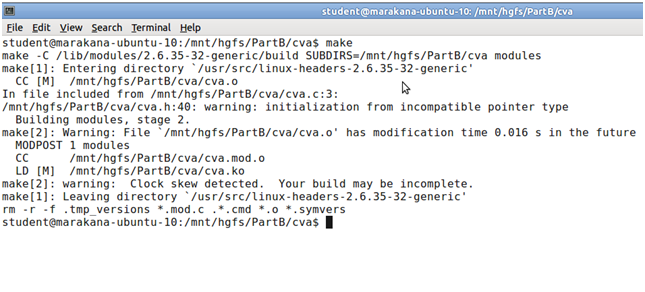
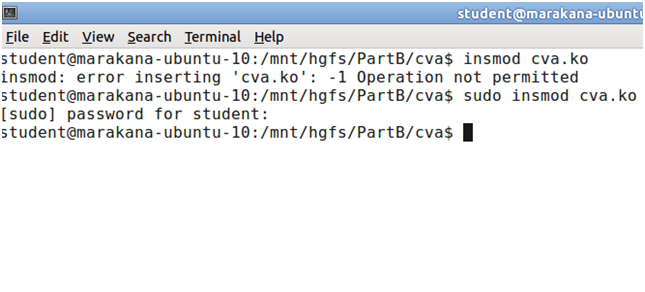
Once the ko file is generated it means the driver is ready to be injected inside the kernel. Dynamic loading is used here. Once the compilation is complete, we can use either insmod or modprobe command ( insmod cva.ko or modprobe cva.ko, of course assuming the current directory contains the compiled module). The difference between insmod and modprobe is that modprobe automatically reads the module to find any dependencies on other modules and loads them before loading the module (these modules must be present in the standard path though.). insmod lacks this feature. As it is a simple example so insmod is enough to load the module. Remember to insert any module to the kernel space you should have the root or admin rights so use sudo command before insmod
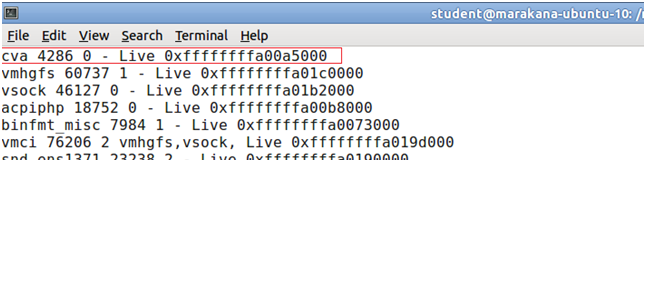
To test if the driver has been loaded successfully, do cat /proc/modules and cat /proc/devices you should see the module name in the first case and device name in the second. Use pipe and more command if your console cannot accommodate all the modules like cat /proc/module | more. This command allows you to scroll through the list.
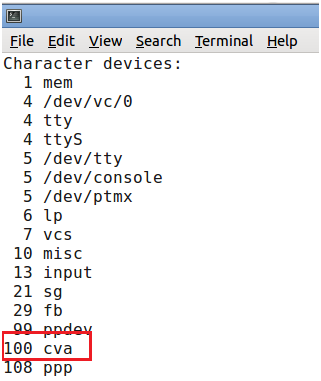
Similarly cat /proc/devices | more will give your device name with the major number that you had mentioned in the driver code while registering.
c between the application and the device file is based on the name of the device file. However, the connection between the device file and the device driver is based on the number of the device file, not the name. This allows a user-space application to have any name for the device file, and enables the kernel-space to have a trivial index-based linkage between the device file and the device driver. This device file number is more commonly referred to as the<major, minor> pair, or the major and minor numbers of the device file. Connecting the device file with the device driver involves two steps:
Registering for the <major, minor> range of device files.
Linking the device file operations to the device driver functions.
The first step is achieved using either of the following two APIs, defined in the kernel headerlinux/fs.h:
int register_chrdev(unsigned int major,const char *name,struct file_operations *fops)
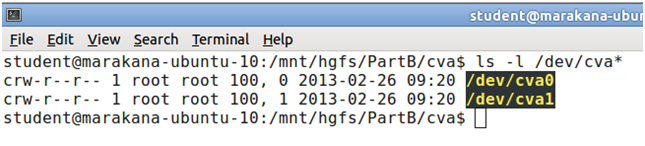
This API registers the major number of device file with the given name. The major number assigned here is 100 and the device name is given as cva. The device files are now created using mknod command with sudo permission. This command is of the form mknod /dev/<file name> b/c major number minor number. After the file name if b is mentioned then you are creating the block device and if c is mentioned then you are creating the character device. So here sudo mknod /dev/cva0 c 100 0 and sudo mknod /dev/cva1 100 1 is used. The major number is the one the kernel uses to link a file with its driver. The minor number is for internal use of the device . Here the major number is 100 and minor number is 0 for device file /dev/cva0 and 1 for /dev/cva1. Since both the device files need to access the same device driver so both the major numbers are same. In the code the minor number is used by the driver for access control i.e. to make read only and write only files. To check if the device has been created or not then use ls –l /dev/cva* command to see the list of files.

According to the problem in the assignment one device file should be read-only and
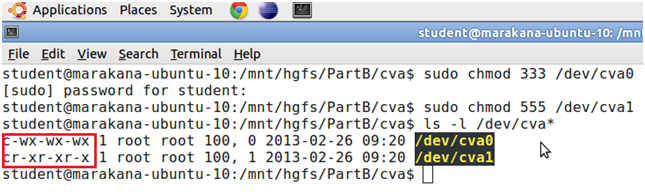
another should be write-only. So the permissions need to be given so for this use chmod command. In linux the permissions can be represented in octal numbers as 4 to “r”, 2 to “w”, and 1 to “x”. Since there is three types of users mode in linux User ,Group and Others. So the octal convention for rwx for user will be 4+2+1 = 7 ,rw for group will be 4+2 = 6 and read operation for others will be 4 so to use chmod command use chmod 765 <filename> . Here /dev/cva0 is write only file so give write and execute permission to it by using the command sudo chmod 333 /dev/cva0 and since /dev/cva1 is read only file so give read and execute permission to it by using sudo chmod 555 /dev/cva1 . To check if the permission has taken effect use ls –l /dev/cva* command.
2.3.3 Write and Read Operation
The write function, cva_write (), is called every time a process uses the write () system call on an open file descriptor associated with one of the device special files belonging to this device driver. The third and fourth parameters to cva_write () are the buffer and character count passed by the user process into the write () system call. The contents of this buffer need to be copied into the device driver’s internal linked list of messages. Remember, though, that you cannot access the user space memory directly via the buffer parameter to cva_write(); you have to use one of the special data transfer functions for that job. First check and ensure that the only the process with /dev/cva0 is open to write messages using the iminor ().
if ((int)iminor(file->f_path.dentry->d_inode)!=CVA_WRITE)
return -EINVAL;
Allocate a block of kernel memory large enough for a single message using kmalloc(). Check to make sure there are no problems and return an error if necessary.
if ((ptr = kmalloc(sizeof(struct cva_buf), GFP_KERNEL))==0)
return -ENOMEM;
Copy length or BUF_LEN characters, whichever is the smaller, from user space into the kernel allocated message space.
len = (int)length<BUF_LEN?(int)length:BUF_LEN;
for (i = 0; i<(int)length && i<BUF_LEN; ++i)
{
get_user(ptr->buffer[i],buffer+i);
printk(“read %c”,ptr->buffer[i]);
}
Link the new message structure on to the end of the linked list in the device driver.
ptr->link = 0;
if (qhead==0)
qhead = ptr;
else
qtail->link = ptr;
qtail = ptr;
printk( “\n”);
Set up the actual message length in the message structure and also return this value from cva_write(). This value will also become the return value to the calling process from the write () system call.
ptr->buf_size = i;
return i;
See Appendix B for complete code.
The cva_read function is called when a user process calls the read () system call to read from a device special file controlled by this device driver. Once again, the buffer and count parameters in cva_read () are a pointer to a buffer in user
space and a character count which were passed as parameters into the associated read () system call. The /dev/cva1 with minor number 1 is made to be used for read only so the check is put in the driver so that the file with minor number 1 cannot be opened for write.
if ((int)iminor(file->f_path.dentry->d_inode)!=CVA_READ)
return -EINVAL;
If there are no messages in the queue then the read() call will not block, but will return the value -1 with the variable errno set to the value ENODATA.
if (qhead==0)
return -ENODATA;
Unlink the head message from the queue and set the variable ptr to point to it.
ptr = qhead;
qhead = qhead->link;
Copy either the number of characters asked for (length) or the actual number of characters in the message buffer (ptr->buf_size) whichever is the smaller, into the user space provided (buffer).
len = (int)length<ptr->buf_size?(int)length:ptr->buf_size;
for (i = 0; i<(int)length && i<ptr->buf_size; ++i)
{
put_user(ptr->buffer[i], buffer+i);
printk(“reading %c”,ptr->buffer[i]);
}
printk( “\n”);
Finally, free the old message structure back to the kernel and return the actual number of characters transferred.
kfree(ptr);
return i;
See Appendix B for complete code.
To see the functionality of the code try to write something to /dev/cva0 file using echo command and redirection operator (>).

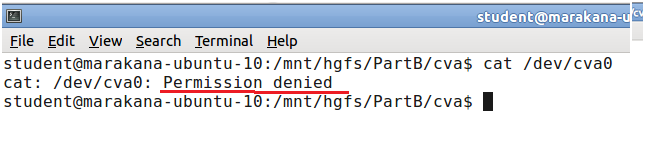
You can check the dmesg to see the logs of the kernel code. Try to see if the permission given is working or not. To check this try to read the /dev/cva0 file using cat command .
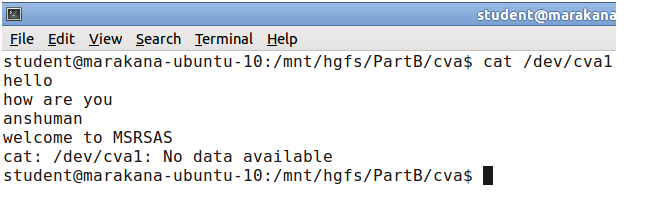
Now try to read the /dev/cva1 file. According to the functionality the strings written to /dev/cva0 file should be shown when /dev/cva1 file is read. use cat /dev/cva1 to read the contents.
To check if the file /dev/cva1 is read only or not then try to write into it using echo command. It should throw error.

2.1 Conclusion
Part B showed how to build a character device driver and load the same in the kernel module and how to create device files and use the device driver. This was a simple implementation where multi user is not supported. Taking this as a basic the code can be further extended to handle multi writers and readers with proper synchronization, mutual exclusion etc. Part C will show you how to make a user application and use the device driver file operations.
References
____________________________________________________________________
[1] Abeni,L., Goel,A., Krasic,C. ,Snow, J., and Walpole,J.(2002)A measurement-based analysis of the real-time performance of the linux kernel,p1–4.
[2] Barbalace,A., Luchetta,A.,Manduchi,G., Moro,M., Soppelsa,A., and Taliercio,C.(Feb 2008),Performance Comparison of VxWorks, Linux, RTAI,and Xenomai in a Hard Real-Time Application.IEEE TRANSACTIONS ON NUCLEAR SCIENCE, V(55-1)
[3] Bovet,D.P.and Cesati,(2005)M.Understanding the Linux Kernel. O’Reilly, 3rd edition.
[4]Corbet,J.,Kret-Hartman,G.and Rubini,A.(2005)Linux device Driver.O’Reilly,3rd Edition.
[5] Xenomai Documentation [Online] available from <www.xenomai.org>[ 18 February 2013]
[6]Marchesotti,M.,Migliardi,M.and Podesta,R.(June 2006)A measurement-based analysis of the responsiveness of the Linux kernel,V(10),p 397–408. IEEE Computer Society.
 IntRendz